Online privacy and access restrictions are common reasons to consider a VPN. FastestVPN offers encrypted connections, IP address masking, and apps for major desktop and mobile platforms. Its features include WireGuard support, a kill switch, and split tunneling on supported apps.
But choosing a VPN involves more than comparing feature lists. Price, privacy practices, connection speeds, and ease of use all matter – and the name “FastestVPN” alone does not tell you how well the service performs.
In this review, we examine FastestVPN’s security and privacy features, server network, pricing, supported devices, and setup process to help you decide whether it’s the right service for your needs.
FastestVPN plans and pricing
FastestVPN currently offers monthly, two-year, and lifetime subscriptions.
| Plan | Price | Billing |
|---|---|---|
| One-month plan | $5.00/month | Billed $5 monthly |
| One year + one year free | $0.83/month | Billed $19.95 every two years |
| Lifetime Plus plan | $40.oo | One-time lifetime purchase |
Any of the three FastestVPN plans includes the following features:
- P2P-compatible servers
- Ad blocking and malware protection
- Unlimited bandwidth and server switching
- Up to 15 simultaneous connections
- WireGuard support
- Customer support through live chat and email
- Password manager
FastestVPN also offers optional paid extras, including additional device connections, a dedicated IP address, and port forwarding. These are separate from the base subscription.
Money-back guarantee
FastestVPN offers a 31-day money-back guarantee for new purchases. It does not offer a free trial: you must pay upfront and request a refund within the applicable period if you decide not to keep the service.
Payment methods
FastestVPN accepts:
- Credit cards, including Visa, Mastercard, American Express, Discover, JCB, and UnionPay.
- PayPal.
- Cryptocurrencies, including Bitcoin, Bitcoin Cash, Ethereum, Litecoin, and Dash.
FastestVPN’s server network
FastestVPN advertises more than 800 servers across more than 49 countries and over 100 locations. Locations include the United States, United Kingdom, Canada, Australia, Germany, Japan, Singapore, Brazil, and South Africa.
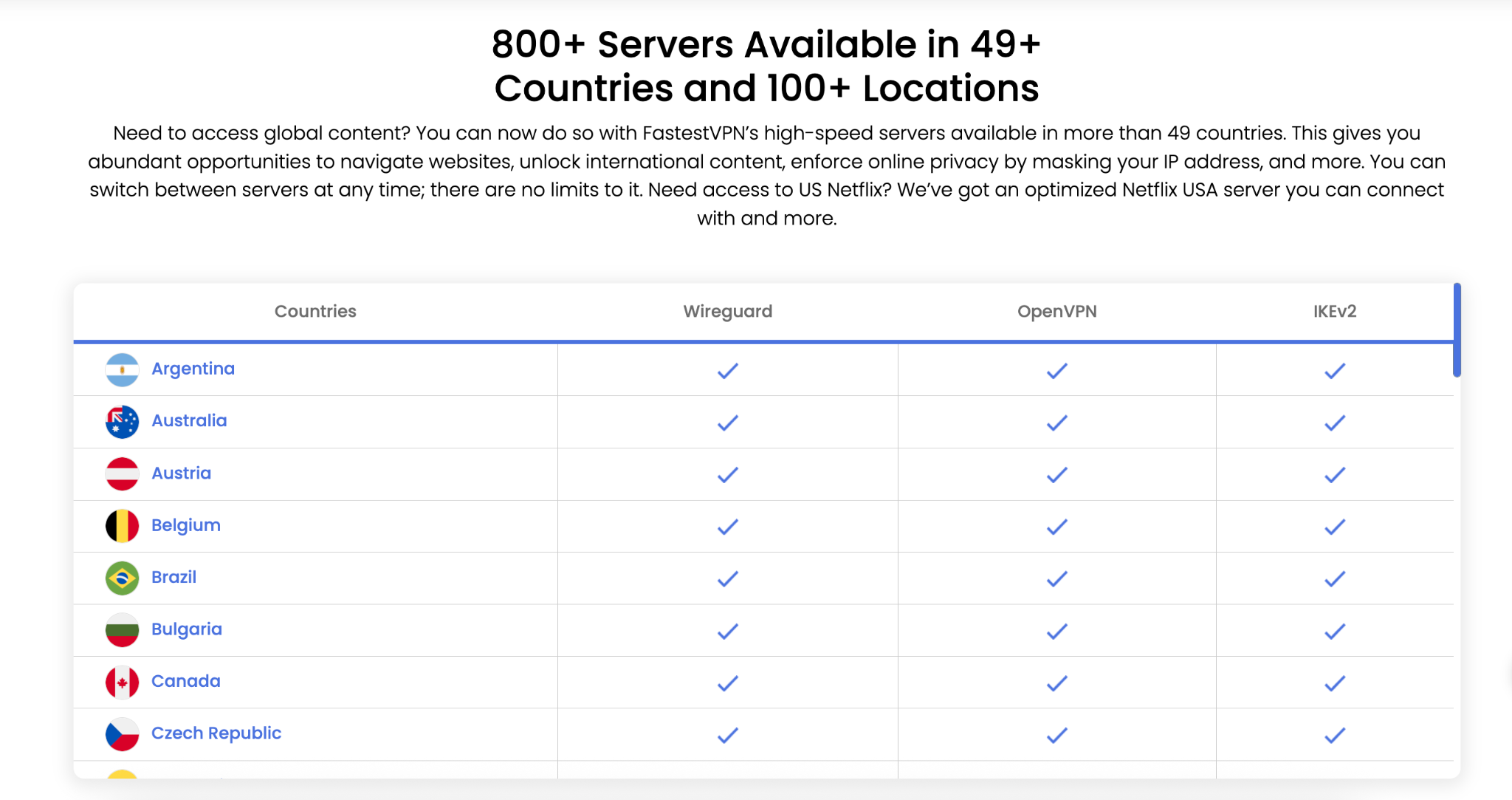
The provider offers unlimited server switching, allowing you to switch locations without an additional charge. Protocol availability can vary by location and device, so check the current server list and app settings if you need a particular configuration.
FastestVPN performance
FastestVPN advertises servers with connections of up to 10 Gbps and supports WireGuard. It also offers streaming support and optimized US servers for Netflix. What is worth noting about FastestVPN servers is that during our tests, Netflix, Hulu, and HBO Max didn’t block VPN connections via FastestVPN.
FastestVPN features
As it has been mentioned above, any of the three FastestVPN plans includes the following functions:
- P2P file sharing
FastestVPN offers servers for P2P file sharing, including torrent downloads and uploads. This can help protect the connection your torrent client uses.
- Malware protection
FastestVPN includes a malware-protection feature, which the provider describes as blocking threats at their source. Treat this as an additional layer of protection that comes with its VPN service.
- Ad blocker
An included ad blocker is designed to reduce advertisements and pop-ups while browsing.
- Unlimited bandwidth and server switching
FastestVPN does not impose data caps and lets subscribers switch between its servers without a numerical limit. You can use the connection for browsing, streaming, and downloads without a fixed monthly VPN data allowance.
- 15 simultaneous connections
The current purchase page includes 15 simultaneous connections per account. Additional connections can be purchased at checkout, billed at $4.00 for each additional device.
- Automated kill switch
FastestVPN offers a kill switch on supported apps. VPN with a kill switch is crucia, as this feature is intended to block internet access if the VPN connection drops, reducing the risk of traffic being sent outside the encrypted tunnel. Feature availability depends on the app and platform.
- Unblocking of geo-restricted websites
FastestVPN lets you connect to servers in different countries, helping you access content unavailable in your location.
Security and privacy
Like many other VPN providers, FastestVPN offers security and privacy features, including the following:
- Encryption and protocols
FastestVPN advertises AES-256 encryption and supports protocols including WireGuard, OpenVPN, and IKEv2. The available protocols depend on the app, device, and connection configuration.
- No-logs policy
FastestVPN states that it does not store browsing history, traffic destinations, DNS queries, or the content users download or stream. Its privacy policy also says it has been independently audited by Altius IT and certified as a no-logs provider.
However, “no logs” does not mean the company collects no information. Its policy identifies account and payment information, app statistics and analytics, and communications with support as data it processes. Payment processing is handled by FastSpring, and FastestVPN states it does not collect credit card details itself.
However, we’ve noticed that the privacy policy also contains inconsistent wording regarding operational information. For example, it lists connection duration among the collected information, while elsewhere stating that connection timestamps are not stored. It also mentions bandwidth information used for maintenance.
- Public Wi-Fi protection
FastestVPN encrypts traffic between your device and its VPN server, helping protect that connection when using public Wi-Fi.
Platform support
FastestVPN offers apps for Windows, macOS, Android, and iOS, along with support for additional platforms and compatible routers.
How to set up an account with FastestVPN
After obtaining a subscription for FastestVPN, you need to download and install the FastestVPN client on the device you want to use it on. You need to take the following steps:
- Visit the official website and choose a subscription.
- Enter your email address and complete payment.
- Download the appropriate app for your operating system.
- Install the app and sign in using the credentials provided.
- Choose a server location and connect.
If you need help configuring a supported device, follow FastestVPN’s platform-specific setup instructions.
Customer support
FastestVPN provides 24/7 support through live chat and email. It also publishes setup tutorials and troubleshooting information for supported devices.
Summary
FastestVPN offers low-cost subscription options, including a lifetime plan, alongside WireGuard support, unlimited bandwidth, P2P-compatible servers, and up to 15 simultaneous connections. Its server network includes more than 800 servers across over 49 countries.
These features make it a great VPN service worth considering. Check the subscription terms, confirm that your preferred features are available on your device, and review its privacy policy before purchasing. New customers are covered by a 31-day money-back guarantee.