NordVPN is one of the few award-winning heavyweights in the contemporary virtual private network arena. Among other things, it boasts a strict no-logs policy, a competitive network of thousands of servers scattered around the globe, advanced security features, an intelligent kill switch, and extras for unblocking Netflix TV shows and other geo-restricted content.
With the feature set already making NordVPN stand out from the mainstream crowd, its functionality underwent a qualitative overhaul in 2026. In particular, the service has made breakthroughs in server network scope, scam call and message protection, and malware prevention through the all-new next-gen antivirus.
Before we proceed, let’s zoom out a bit to get the big picture and understand how to separate the wheat from the chaff when it comes to gauging virtual private network services. Some people think a VPN service is only as good as the degree of online anonymity it delivers. Others primarily focus on how prolific the features are. Both perspectives make sense, but only partially.
In fact, the bar has been raised higher than that in the virtual private network industry over the years. A mature solution that strikes a golden mean is one that prevents your traffic from being attributed to you, is equipped with nifty privacy and security extras, ensures consistently solid connection speeds, and takes over most of the tedious decision-making for you.
NordVPN claims to have all of these areas covered, but does it really live up to this status, though? In this review, we will analyze NordVPN from multiple angles to determine whether it’s worth its salt. The benchmarks to be scrutinized include the server network, connection speeds, unblocking geo-restricted streaming platforms, leak prevention, pricing, performance, tech support, and overall efficiency.
NordVPN – Brief Overview
The fundamental traits of NordVPN in its current state are as follows:
- Thousands of servers in 225 locations
- No-logs VPN policy
- SmartPlay feature for geo-restricted content
- Improved system-wide and per-app kill switch
- Double VPN (double encryption)
- Onion over VPN
- P2P supported on all standard servers
- Dedicated IP address (available as an add-on)
- Next-gen antivirus
- Fastest connection speeds in our tests
- Up to 10 simultaneous connections
- Custom obfuscation protocol NordWhisper for restricted networks
- Unlimited bandwidth
- 24/7 customer support
- Reasonable price
- Cryptocurrency payments accepted
- Panama jurisdiction.
With such commendable statistics and an unparalleled feature set, it comes as no surprise that NordVPN has been the talk of the town over the past few years. By the way, it splashed onto the scene in 2012, so it’s quite an oldie whose evolution appears to be still underway.
Does it follow through with all of its ambitious claims? Let’s go ahead and see.
NordVPN – Getting Started
NordVPN is a no-brainer to install on any device. Another welcome feature is that you can use NordVPN on up to 10 devices simultaneously with a single VPN account. On top of that, it supports routers.
Installing NordVPN on Windows is straightforward. The current app supports Windows 10 (64-bit) and Windows 11. Here’s how it works:
- Download the NordVPN app from its official website and open it
- Approve the Windows permission prompt, click Next, and select or deselect any optional browser extensions before clicking Install
- Once installation finishes, launch NordVPN and click Log In
- Sign in through the Nord Account page in your browser, then allow it to reopen the app
- Click Secure my connection to connect automatically, or choose a server location yourself
You’ll need an active subscription to use the VPN. Next, let’s look at NordVPN’s plans and pricing.
NordVPN Pricing, Plans, and Refunds
NordVPN offers monthly, one-year, and two-year subscriptions. Longer subscriptions generally have a lower introductory monthly rate, but you pay the full initial term upfront.
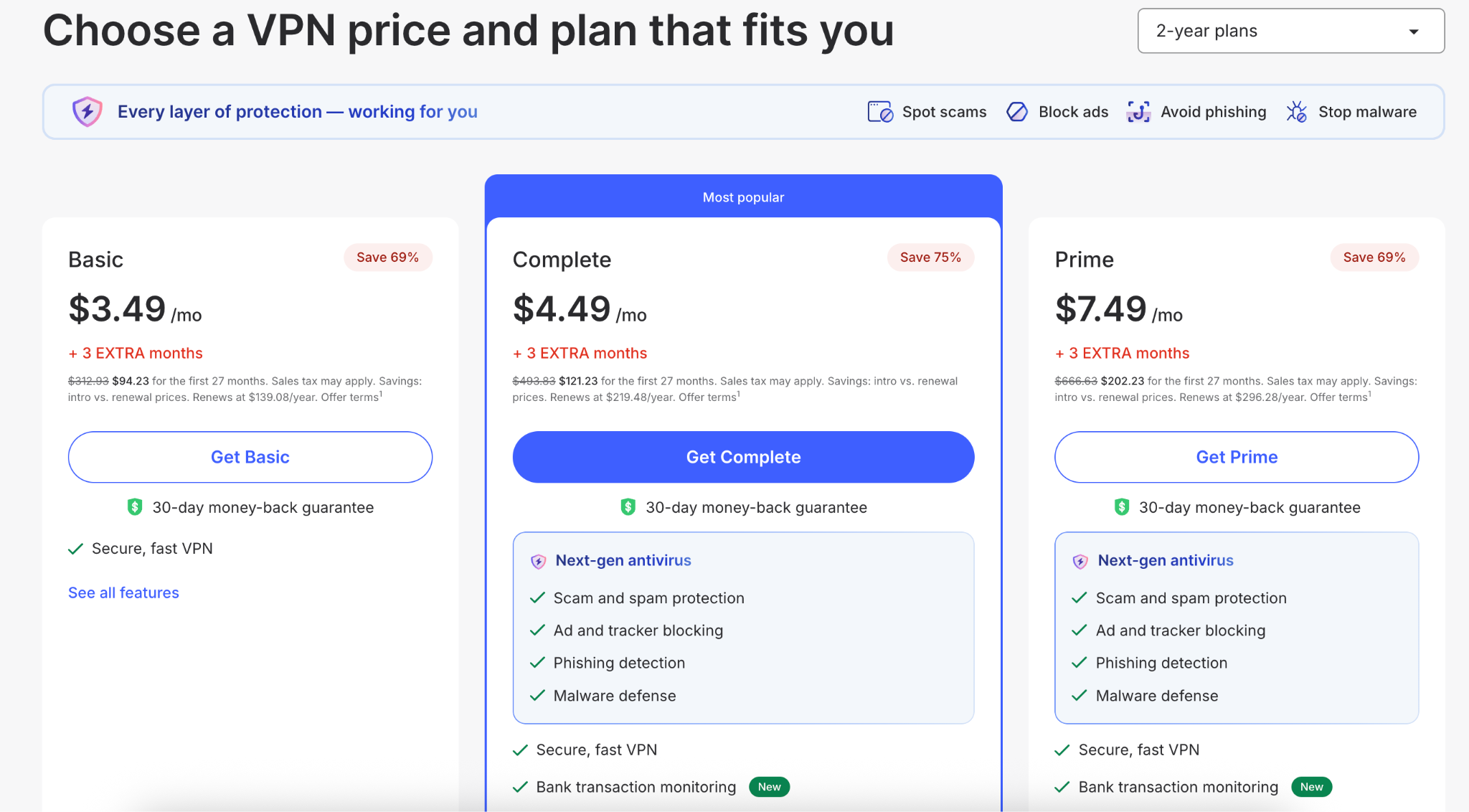
Obviously, the 2-year subscription is the most cost-efficient, regardless of the plan. NordVPN’s Basic plan includes VPN access, protection for up to 10 devices simultaneously, and selected security features. Complete adds extras such as next-gen antivirus, a password manager, and 1TB of encrypted cloud storage. Prime adds identity-protection benefits, subject to eligibility and additional terms. A dedicated IP address costs extra.
NordVPN accepts credit and debit cards, PayPal, cryptocurrencies, and selected local payment methods. Available options depend on your location and checkout. Most supported payment methods create an automatically renewing subscription, although NordVPN lists exceptions for CoinPayments, prepaid cards, and gift cards.
NordVPN offers a 30-day money-back guarantee on initial subscription purchases. Renewals are not covered by this guarantee unless local law requires otherwise. You can request a refund through customer support, and depending on your payment method, the refund will reach your account within 10 business days.
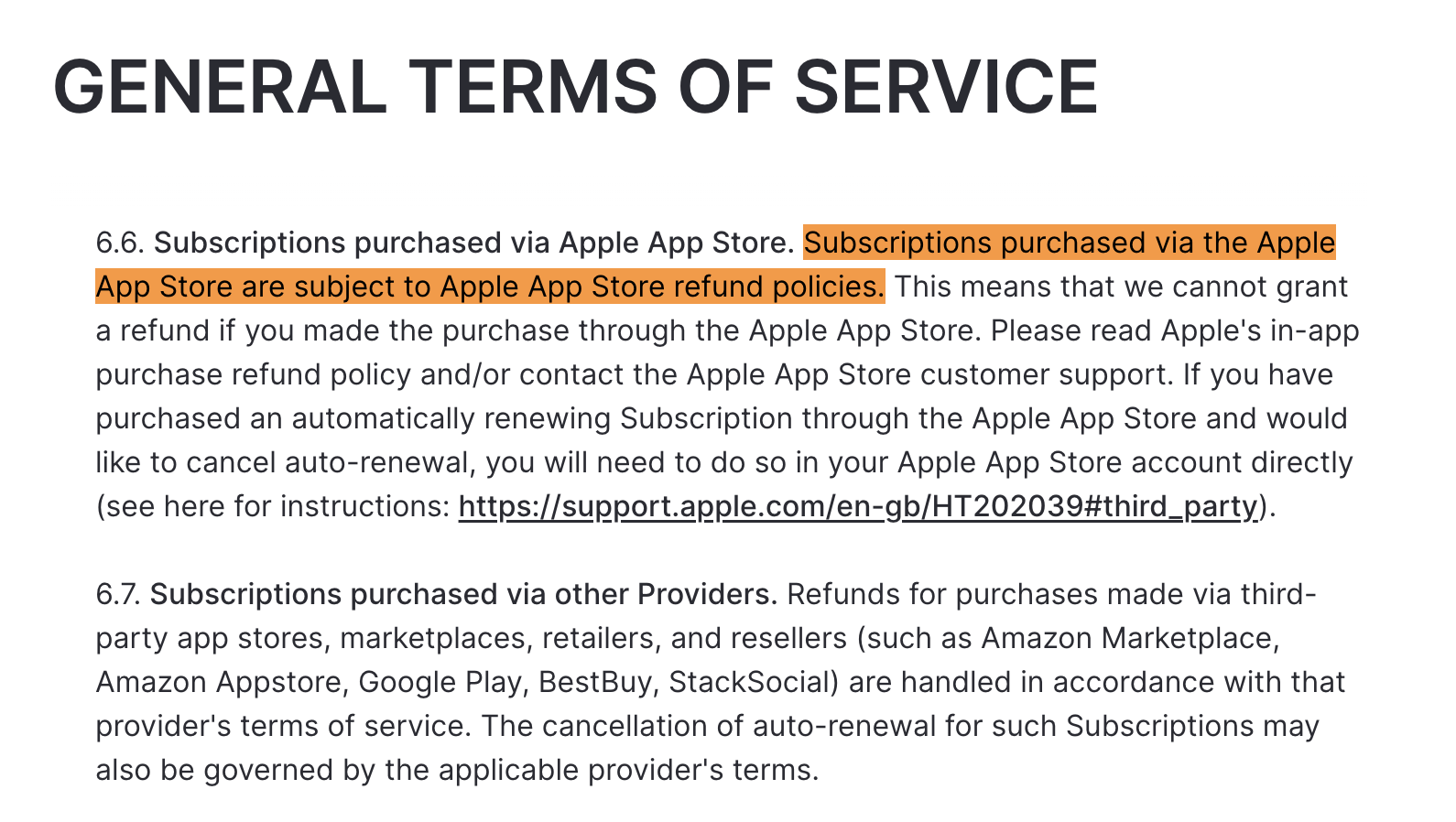
However, it’s important to note that purchases through Apple’s App Store, Amazon, or other third-party marketplaces are subject to the retailer’s refund process. Here’s an excerpt from NordVPN’s terms of service regarding subscriptions purchased through other providers:
Alternatively, you can get a 3-day free trial (check if other VPNs offer a free trial) if you have an Android device. However, there is a caveat: you are still required to enter your credit card information.
Whichever plan you opt for, you can now finally start your virtual private network journey with NordVPN.
NordVPN Servers and Connection Speeds
NordVPN operates thousands of servers across 225 locations worldwide. Its network includes both physical and virtual locations: with a virtual location, the server can be physically hosted in a different country from the IP address it provides.
The size of the network gives you plenty of connection options, but server count alone doesn’t establish how fast the VPN will perform. To assess this, we compared our baseline connection without the VPN, which was 940 Mbps, against results from several server locations.
The nearby UK server retained 96% of our baseline download speed, while the US connection retained 93%. All in all, NordVPN delivered consistently fast speeds in our in-house tests and, during everyday use, we experienced no issues, whether streaming, torrenting, or casual browsing.
NordVPN can automatically select a recommended server, or you can choose a country or city yourself. If one connection performs poorly, you can try another location rather than assuming all servers in that country will deliver the same result. NordVPN does not impose bandwidth or speed limits on its standard VPN service.
NordVPN also offers obfuscated connections to disguise VPN traffic, along with its NordWhisper protocol for restrictive networks. If you’re wondering whether NordVPN will work reliably in China, note that the provider maintains separate, platform-specific troubleshooting guidance for connections from that country. Before traveling, we recommend installing the app and obtaining the latest setup instructions, but treat access as uncertain rather than guaranteed.
NordVPN Features
Here’s a breakdown of the most enticing and competitive features of NordVPN.
- Next-gen antivirus
NordVPN’s next-gen antivirus, built on the former Threat Protection Pro, helps block malicious websites, phishing attempts, intrusive ads, and trackers. It also scans downloaded files for malware and removes detected threats. In the app, you’ll find these features under Scam, phishing, and malware protection.
Unlike a traditional antivirus, it focuses on preventing online threats from reaching your devices rather than scanning them for existing infections.
- Kill switch
NordVPN offers two kill switches, both of which must be enabled in the settings. Internet kill switch blocks internet access when the VPN disconnects, helping prevent traffic from travelling over an unprotected connection. App-level kill switch closes applications you select when the VPN disconnects. However, note that it doesn’t block other apps from accessing the internet unless the internet kill switch is also enabled.
These features help reduce accidental exposure of your IP address and traffic if the VPN connection drops.
- Double VPN
The Double VPN option adds an extra layer of encryption to your web surfing, tunneling your connection through two servers rather than one. Essentially, your data is encrypted twice in this scenario.
Unfortunately, with NordVPN, there are only predefined Double VPN server combos you cannot change, nor can you create your own. Some of the available ties include Canada-US, Sweden-Denmark, and UK-France.
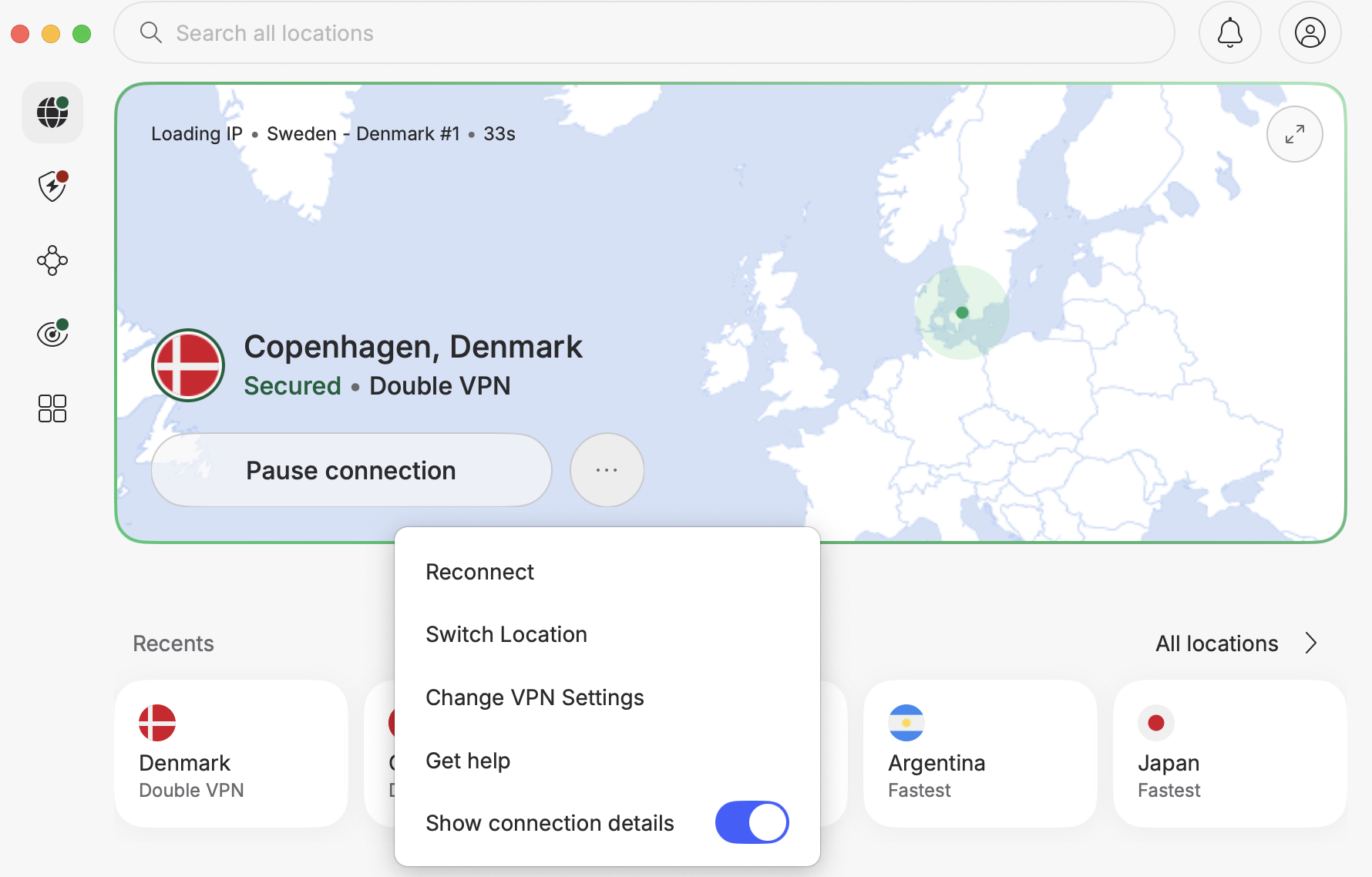
Be advised that the connection speed will slow down as long as this feature is enabled. This is the flip side of advanced security.
- Onion Over VPN
The Onion Over VPN feature combines the benefits of virtual private networking with the anonymizing merits of Tor technology (The Onion Router). It delivers rock-solid privacy by first routing your traffic through a VPN server and then directing it to the Tor network.
Bear in mind, though, that your connection speed will slow to a crawl if you turn this feature on. Should you badly need to use Tor alongside VPN, you’re probably better off simply visiting sites via Tor Browser while being connected to one of NordVPN’s servers.
- P2P support
NordVPN now supports torrenting and other peer-to-peer activities on all its standard servers, so you no longer need to select a separate P2P server category. Instead, you can let the app recommend a server or choose a location manually.
- NordVPN SmartPlay
There aren’t many VPNs that work with streaming media giants. NordVPN is one of the few that fly under the blocking radar of such services, including Netflix, Hulu, Amazon Prime, ESPN, and many more.
You don’t have to enable anything to enjoy streaming content without buffering or bandwidth throttling, no matter where you are. SmartPlay combines Smart DNS technology with NordVPN’s encrypted VPN connection to help you access streaming content securely. It works automatically in all NordVPN’s apps by default when you connect to a server, so there’s no separate setting to enable.
- Dedicated IP
NordVPN offers a dedicated, unique IP address that will be assigned to no one but you. Note that this feature requires an additional fee of $3.69/month. NordVPN’s dedicated IP addresses are available in 27 locations, including the Netherlands, the UK, the US, and Germany.
Any there any DNS or IP leaks?
Moving on with the NordVPN review, we also checked the service for leaks of users’ online sensitive data and the notorious WebRTC vulnerability. Here is the typical result that the popular ipleak.net resource returned for an arbitrary server we tested:
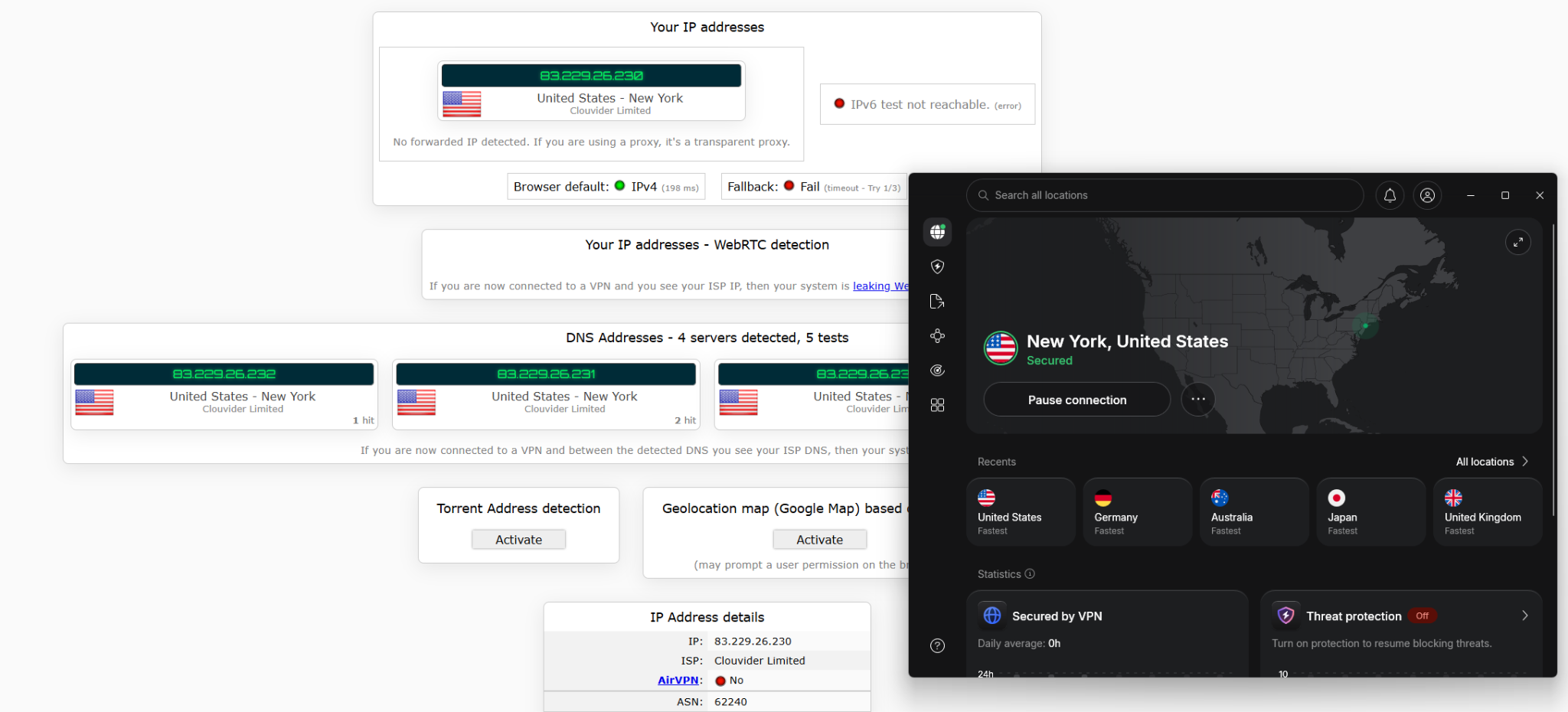
So, obviously, there are no IPv4 or DNS leaks with NordVPN, IPv6 is being blocked as it should, and the tool successfully passed the WebRTC detection test. In plain words, rest assured, you are good to go in terms of privacy with NordVPN standing sentinel over it.
No Logs
The vendor claims to follow a stringent no-logs policy. Here’s what its General Privacy Policy has to say in this context:
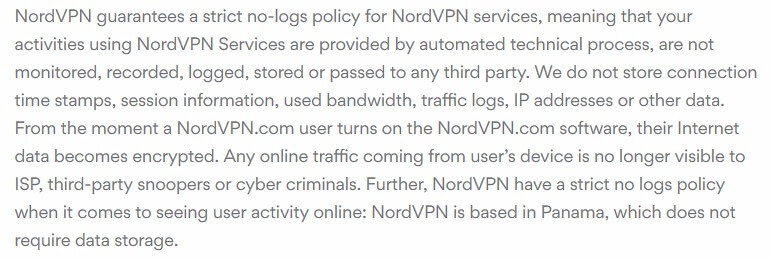
With that said, NordVPN does retain some information about its customers: email addresses and payment details, as both are required for subscription. However, this won’t be an issue if you register with an email alias and pay with Bitcoin.
Panama Jurisdiction
NordVPN operates under Panama’s jurisdiction, and Panama has no mandatory data retention requirements that apply to VPN providers, allowing NordVPN to operate without retaining users’ online activity logs.
However, this doesn’t make NordVPN immune to legal requests. Its privacy policy says it may disclose the limited personal information it holds when required through a valid legal process under Panamanian law. For example, NordVPN reports that an October 2024 warrant required it to provide payment-related information and confirm an account’s existence, while the provider states it had no traffic or connection logs to disclose.
NordVPN Customer Support
There are plenty of support options to choose from. NordVPN’s Support Center, which is linked directly from the Settings pane, includes hundreds of user-friendly, comprehensive tutorials and FAQs.
Whereas interactions with NordVPN representatives used to be limited to email tickets, the provider now offers a 24/7 live chat service. You can access it by clicking on the Support widget in the bottom right-hand corner of its website.
The support agents are polite and won’t keep you waiting long. Overall, customer support is one of NordVPN’s strengths.
NordVPN – Pros & Cons
Pros:
- Thousands of servers in 225 locations
- No logs
- Up to 10 devices per license
- Intuitive apps
- Excellent speeds
- Supports US Netflix
- Smooth torrenting
- No leaks
- Multifunctional kill switch
- Next-gen antivirus
- Extra privacy tools (Double VPN, Onion Over VPN)
Cons:
- Expensive 1-month subscription
- Free trial is only 3 days long
The Bottom Line
NordVPN is a reputable VPN service keeps your online activities away from prying eyes, offers advanced security features, works well with popular streaming services, and doesn’t retain activity logs. NordVPN also has a vast server network across 225 locations and delivered very fast speeds in our tests. Plus, it’s easy to use and provides knowledgeable support via live chat.