hide.me is a Malaysia-based VPN with free and paid plans. It encrypts your internet connection and masks your public IP address to help you browse more privately. Its free plan includes unlimited data, making it a great way to try the service without committing to a subscription.
In this review, we examine hide.me’s privacy features, apps, pricing, and limitations to help you decide whether this VPN suits your needs.
What it costs to enjoy hide.me’s services?
hide.me offers free and paid plans. The main differences between the current plans are server access, simultaneous connections, and additional features.
⇒ Free plan. hide.me’s free version costs nothing and does not require registration or a credit card. It includes unlimited data, one connection at a time, access to eight server locations, no ads, and a no-logs policy. With the free plan, you can try the service risk-free or protect a single device at no cost. However, it offers fewer server locations than paid plans and does not include streaming support.
⇒ Paid plans. hide.me’s subscription includes unlimited data and bandwidth, 10 simultaneous connections, and access to more than 2,600 servers in over 92 locations. It also includes streaming support and dynamic port forwarding.
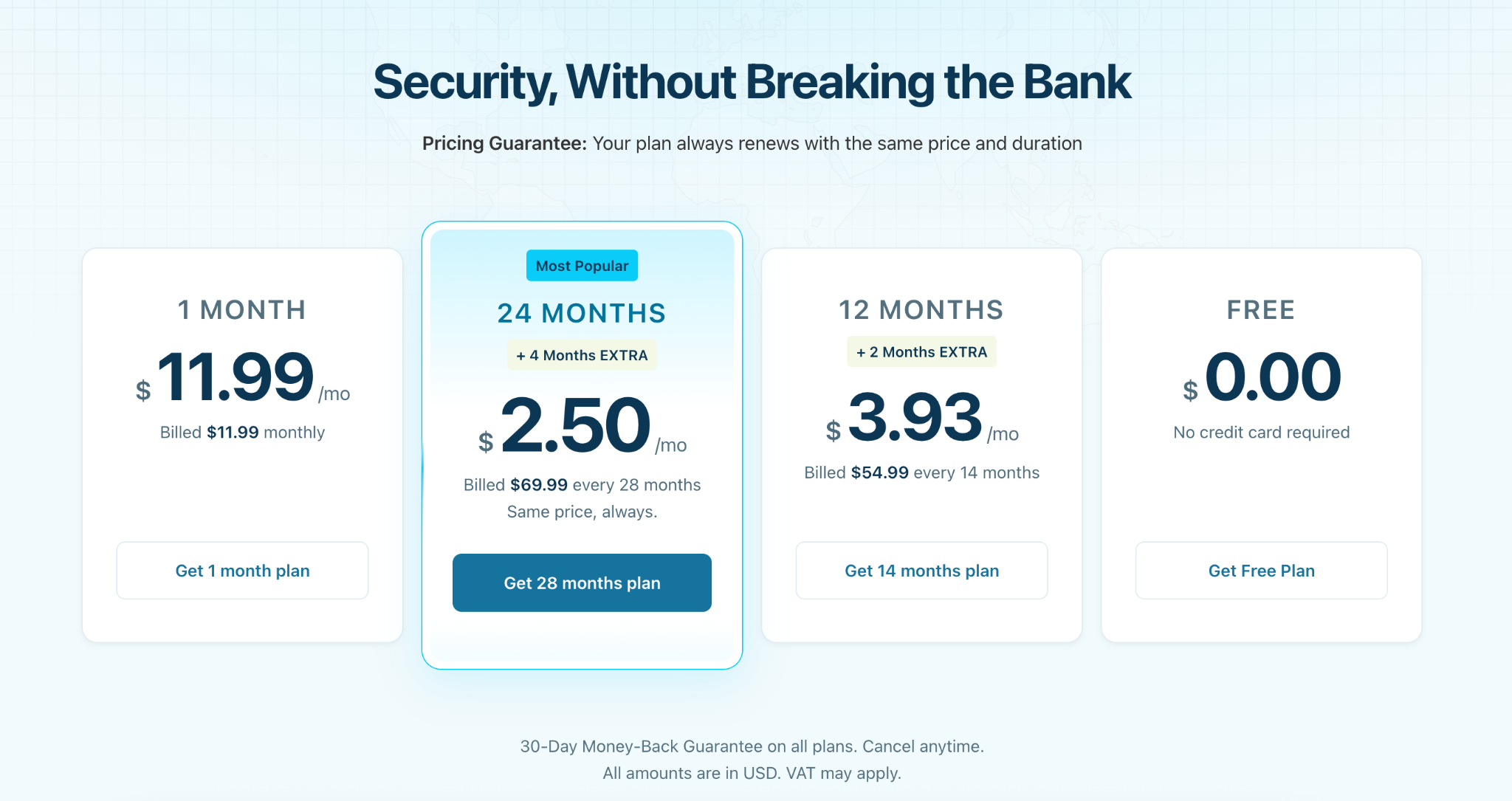
Pricing:
- 1 month: $11.99 per month, billed monthly
- 12 months: $3.93 per month, plus 2 months extra – billed every 14 months
- 24 months: $2.50 per month, plus 4 months extra – billed every 28 months
Longer subscriptions require an upfront payment. hide.me accepts credit cards, PayPal, Apple Pay, Google Pay, and bank transfers. Cryptocurrency options include Bitcoin, Ethereum, Litecoin, Dogecoin, and selected stablecoins. hide.me currently advertises a 30-day money-back guarantee. It describes the guarantee as “no questions asked” and allows subscribers to cancel at any time.
hide.me features and add-ons
hide.me offers a free web proxy, an IP address checker, and SOCKS proxy support. These tools serve different purposes and should not be confused with the full-device protection provided by its VPN apps.
Check IP address:
hide.me’s free IP checker displays your public IPv4 and IPv6 details, approximate location, and internet service provider. You can use it before and after connecting to the VPN to check whether your visible IP address has changed.
Free web proxy:
The free web proxy works directly in a desktop or mobile browser without an account or software installation. Enter a website address and choose a proxy location in Germany, the Netherlands, or Finland. The destination website then sees the proxy’s IP address rather than your own.
Additional options let you control cookies, remove scripts or objects, and enable URL or page encryption settings. Your connection to hide.me’s proxy website uses HTTPS, but this is not equivalent to an encrypted VPN tunnel covering all device traffic.
The proxy may help with some website restrictions, but it does not guarantee access to every blocked site or provide complete anonymity. hide.me recommends its VPN service for more comprehensive protection, particularly when handling sensitive information.
SOCKS proxy support:
Paying subscribers can configure hide.me’s SOCKS proxy in supported browsers and torrent clients. The proxy is accessible only while connected to hide.me’s VPN network. If the VPN disconnects, the configured application loses access to the proxy, helping prevent it from continuing over an unprotected connection.
This makes SOCKS support an additional safeguard for correctly configured applications, still not a replacement for VPN encryption.
Availability of hide.me
hide.me is a Malaysia-based VPN service, with its website and support operations also based in Germany. Its current network offers servers in 92 locations across six continents.
The service supports P2P and torrenting on its standard servers. However, P2P traffic is not supported on its optimized streaming servers, and the free plan does not permit torrenting.
Have a look at the list of hide.me’s server locations by region:
| Region | Countries |
|---|---|
| North and South Americas | Brazil, Canada, Colombia, Mexico, and the United States. |
| Europe | Albania, Austria, Belgium, Bulgaria, Croatia, Czechia, Denmark, Finland, France, Germany, Greece, Hungary, Iceland, Ireland, Italy, Lithuania, Luxembourg, Moldova, the Netherlands, Norway, Poland, Portugal, Romania, Serbia, Slovakia, Spain, Sweden, Switzerland, Turkey, Ukraine, and the United Kingdom. |
| Asia and the Middle East | Bangladesh, Cambodia, Hong Kong, Japan, the Philippines, Singapore, South Korea, Taiwan, Thailand, the United Arab Emirates, and Vietnam. |
| Africa | South Africa and Morocco. |
| Oceania | Australia and New Zealand. |
hide.me’s functionality
hide.me offers a broad set of VPN features, including modern protocols, leak protection, split tunneling, a kill switch, and optional multihop routing. Some advanced tools are available only with a paid subscription, so it’s important to distinguish between features included in both plans and those reserved for paid users.
- Modern VPN protocols
hide.me supports WireGuard, OpenVPN, IKEv2/IPsec, SoftEther, and SSTP. WireGuard is available on all hide.me servers and apps, while OpenVPN supports up to AES-256 encryption across its supported platforms.
The service also offers a Bolt feature, described as a fast proxy option that can improve connection speed on supported Windows connections. Bolt is exclusive to Premium subscribers
- Privacy and leak protection
hide.me’s apps include protection against DNS, IPv4, IPv6, and WebRTC leaks. Its Android app also routes DNS requests through hide.me’s VPN servers rather than those operated by your internet service provider.
A kill switch is available on both free and paid plans. It can stop internet activity if the VPN connection fails, helping prevent traffic from continuing outside the encrypted tunnel.
- Split tunneling
Split tunneling lets you choose which apps use the VPN connection and which connect directly to the internet. It is available on Windows, macOS, and Android, including for free users. This can be useful if you want to protect sensitive apps while allowing other apps to use your normal connection.
- Multihop and port forwarding
Premium users can use Multihop VPN to route traffic through an entry and exit server in different locations. This adds an extra layer of routing complexity, though it may also affect connection speed.
Premium also includes dynamic port forwarding, which uses UPnP or NAT-PMP to open ports when needed. This can be useful for gaming, P2P file sharing, and other applications that require direct connections.
- SmartGuard and other extras
Premium includes SmartGuard, which blocks ads, trackers, and malicious websites. Paying users also have access to dynamic port forwarding, Bolt, and optional static IP addresses.
hide.me’s security and Privacy
hide.me has an independently audited no-logs policy and does not permanently store identifiable user activity, connection timestamps, or public IP addresses. A 2024 audit by Securitum found no evidence of tracking, DNS logging, or traffic inspection. The service supports WireGuard, OpenVPN, IKEv2/IPsec, SoftEther, and SSTP. It uses AES-256 encryption and includes protection against DNS, IPv6, and WebRTC leaks.
Hide.me’s customer support service
hide.me’s customer support team operates through an easy-to-use contact form. The response team is quite quick, and you can enjoy great support even during weekends. There is also a great online community page that helps you solve general questions all on your own.
hide.me connection problems
If hide.me won’t connect, start with the basics: check your internet connection, make sure you’re using the latest version of the app, and try a different server location. If the issue persists, work through the steps below.
#1 Check firewall and antivirus software
A firewall or antivirus program may block the VPN client or its traffic. Temporarily disable it to test whether that resolves the issue; if it does, add an exception for the hide.me app rather than leaving your security software disabled.
#2 Try another protocol
Some networks block specific VPN protocols or ports. Switch between WireGuard, OpenVPN TCP, OpenVPN UDP, IKEv2, SoftEther, and SSTP to see whether another option works. OpenVPN TCP can be especially useful on restrictive networks.
#3 Test a different network
Connect using a mobile hotspot or another Wi-Fi network. If hide.me connects there, the original network’s router, firewall, or ISP is likely blocking the connection.
#4 Check router and ISP restrictions
Open your router’s settings and confirm that VPN passthrough or VPN traffic is allowed. If the VPN fails on every network and protocol, contact your ISP to ask whether it blocks VPN traffic
#5 Verify account and app settings
Confirm that you’re signed in with the correct account and that your subscription is active. Reinstalling the app or resetting its settings can also resolve configuration errors.
#6 Contact customer support
If none of these steps work, contact hide.me’s 24/7 support through live chat, email, or a support ticket. Include your device, operating system, app version, selected protocol, and any error message.
How to set up a hide.me account?
You can use hide.me without creating an account, but registering lets you manage your subscription, upgrade to the paid plan, and access your account settings. The free plan requires only an email address and no credit card.
Follow the steps below if you want to set up hide.me VPN for free:
- Go to hide.me’s registration page and enter your email address.
- Open the verification email and select “Activate my account.”
- Choose a username and password, then select “Create Account.”
- Sign in to the website or hide.me app using your new account details.
You can also download the app and use the free plan without registering. On Android, for example, you can download the app, tap “Enable VPN,” and connect without signing up.
To get a paid hide.me account, follow these steps:
- Sign in to your hide.me account and open the subscription section.
- Select “Upgrade Your Plan” and choose a monthly or annual Premium plan.
- Complete checkout using your preferred payment method.
- Download the app for your device if you haven’t already, then sign in and connect.
If you already have the hide.me app installed, your premium subscription activates automatically once payment is processed. there’s no need to reinstall it.
hide.me and compatibility
hide.me offers native apps for Windows, macOS, Linux, Android, iOS, Amazon Fire TV, Apple TV, and Android TV. It also provides browser extensions for Chrome, Firefox, and Microsoft Edge.
For mobile use, download hide.me from the App Store on iOS or Google Play on Android. On a desktop, download the appropriate client directly from hide.me’s website.
You can also configure hide.me manually on compatible routers and NAS devices, which protects every device connected to that network. Supported router platforms include AsusWRT, DD-WRT, OpenWrt, Tomato, and pfSense. Router setup is manual, so it’s best suited to users comfortable with network configuration.
hide.me’s paid plan supports up to 10 simultaneous connections, while the free plan supports one connection at a time.
Terms of service
Before subscribing to hide.me, review its terms of service and privacy policy. The privacy policy explains what the company collects, what it does not log, and how it handles payments and legal requests.
hide.me asks for an email address when you create an account, but does not require your name, physical address, or IP address. When you connect to the VPN, it keeps only a temporary troubleshooting log with an anonymous internal identifier. The provider states this is erased every few hours and is not linked to your real IP address.
hide.me does not log VPN sessions, browsing activity, websites visited, or connection timestamps. Payments are handled by third-party providers, including Paddle, Cleverbridge, PayPal, CoinPayments, Apple, and Google Play.
The company may disclose information if legally required by a court order from a jurisdiction that applies to it, but cannot provide information it does not have
Summary
hide.me is a privacy-focused VPN with an independently audited no-logs policy, broad platform support, and a generous free plan. Its paid plan adds more server locations, streaming support, 10 simultaneous connections, and advanced features such as Multihop and dynamic port forwarding.
hide.me pros:
- Free plan with unlimited data and no registration required.
- Independently audited no-logs policy.
- Supports WireGuard, OpenVPN, IKEv2, SoftEther, and SSTP.
- Includes DNS, IPv6, and WebRTC leak protection.
- Apps for major desktop, mobile, and TV platforms, plus browser extensions.
- Premium supports up to 10 simultaneous connections.
hide.me cons:
- Free users are limited to one connection and cannot use P2P traffic.
- Premium’s longer plans require payment upfront.
- The network has fewer locations in some regions, including Africa and the Middle East.
- Router setup requires manual configuration.