Whether you're new to VPNs and wondering what they can do for you or are an experienced user comparing providers, reading an independent review before subscribing can help you make an informed decision. This PureVPN review examines the service's main features, performance, security, privacy protections, and potential drawbacks to help you decide whether it's worth your money.
Online privacy and cybersecurity remain important concerns, with data breaches, tracking, and phishing threats affecting internet users every day. PureVPN aims to improve your online privacy by encrypting your internet traffic and masking your IP address, helping reduce exposure to snooping and unwanted tracking. It also offers servers in multiple countries, allowing you to change your virtual location and potentially access region-restricted websites and streaming content.
In this review, we'll take a closer look at PureVPN's connection speeds, server network, streaming capabilities, security features, privacy policy, and overall value to determine whether it deserves a place on your VPN shortlist.
PureVPN plans and prices
PureVPN offers Standard, Plus, and Max subscriptions, with monthly, annual, and multi-year billing options. Its current two-year promotion includes three extra months, with prices starting at $2.15 per month for the Standard plan. Note that longer subscriptions require an upfront payment rather than monthly installments. Here’s how the plans break down:
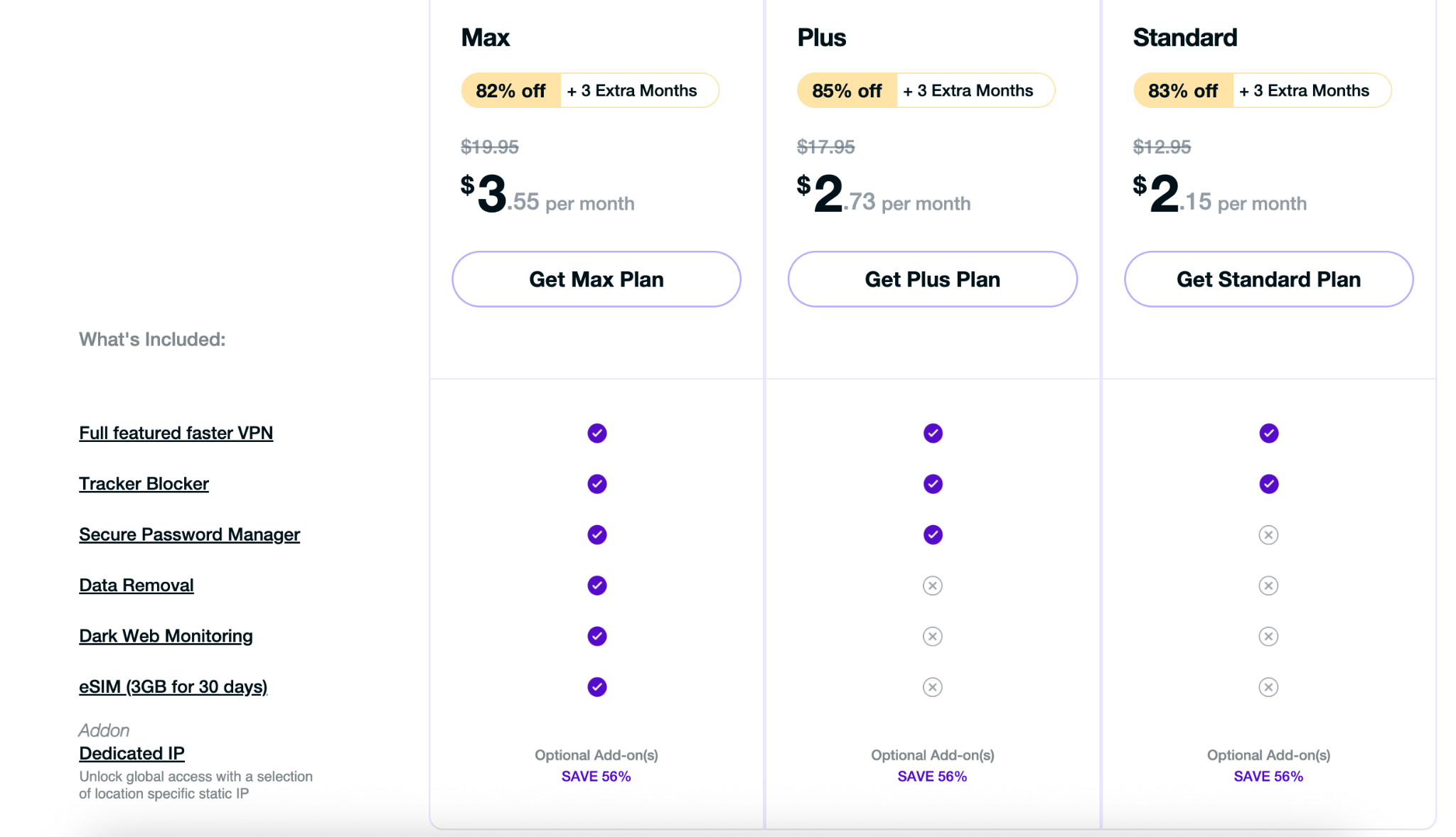
- Standard from $2.15 per month, billed at $58.20 upfront. This is the entry-level option for users who primarily need the VPN. Renews at $47.95 annually.
- Plus from $2.73 per month, billed at $73.80 upfront. This tier bundles the VPN with additional privacy tools. Renews at $69.95 annually.
- Max from $3.55 per month, billed at $95.85 upfront. This is the highest-tier bundle, with more extras than Standard or Plus. Renews at $84.95 annually
All three plans support up to 10 simultaneous connections. Eligible first-time purchases include a 31-day money-back guarantee, although cryptocurrency payments and renewals are excluded. Promotional prices and bonus months can change, so check the checkout terms before subscribing.
PureVPN also offers a 7-day trial that starts at $0.99 and includes access to the features in your chosen plan, with support for up to 10 simultaneous connections. This is a paid trial, not a free VPN subscription. You can also get a 7-day free trial through PureVPN’s iOS app, subject to the App Store’s subscription terms. To avoid being charged, turn off automatic renewal at least 24 hours before the trial ends. The website trial also converts automatically to a paid subscription unless you cancel before it expires.
Pure VPN for Teams
PureVPN for Teams helps businesses manage employees’ VPN access through a centralized dashboard. Administrators can add or remove users, manage billing, and configure static IP access to company resources. The service supports up to 1,000 user accounts with no device limit on paid plans.
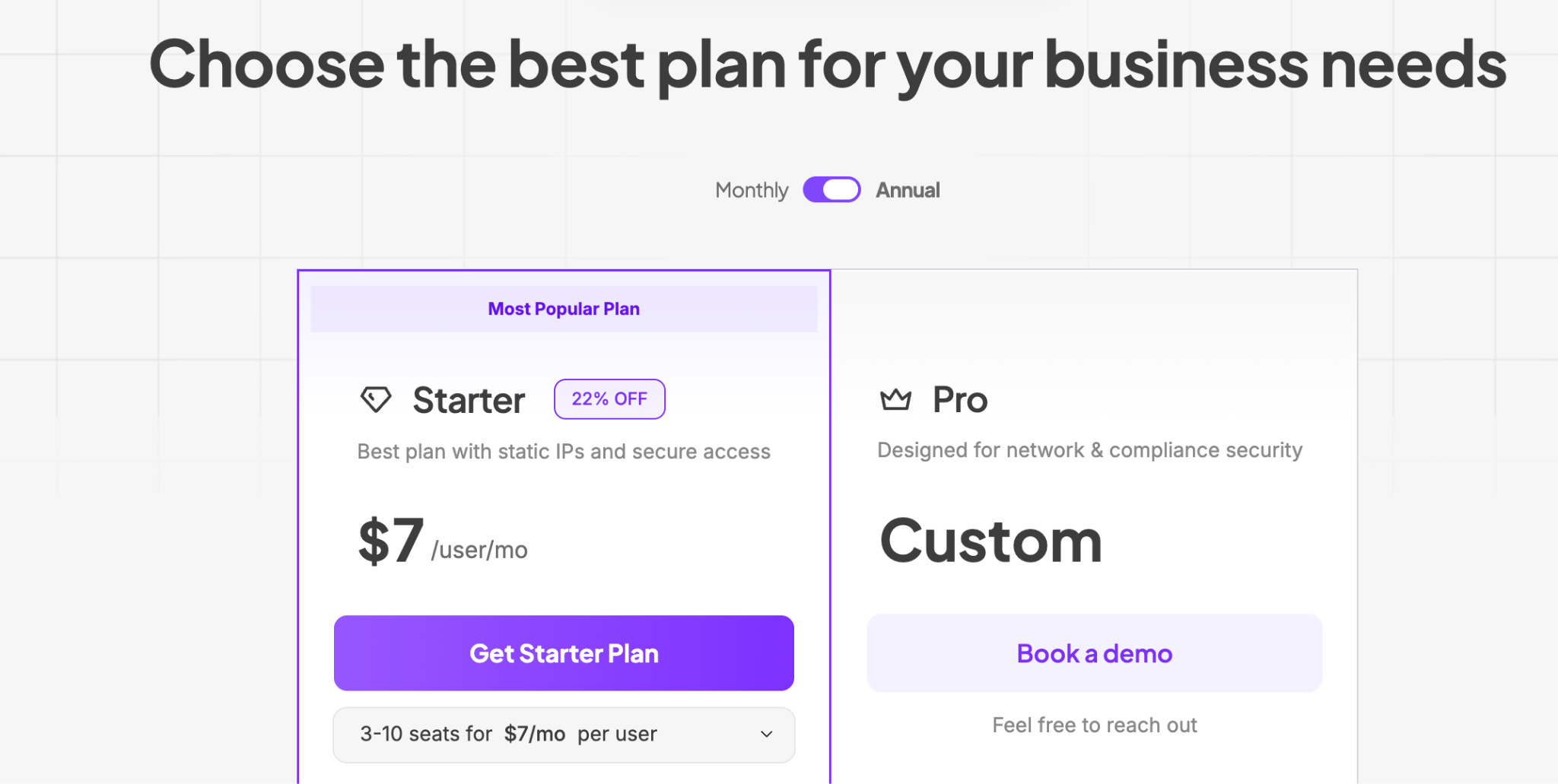
- Starter costs $7 per user per month for 3–10 users with annual billing. It includes centralized VPN management and multi-factor authentication, with lower per-user rates for larger teams.
- Pro offers custom pricing and adds single sign-on, automated user provisioning, role-based permissions, device security checks, activity logs, and priority support.
Static IPs, port forwarding, and a shared team server are available at an additional cost. Paid plans come with a 14-day money-back guarantee, and businesses can contact PureVPN to arrange a Pro demo or trial.
Info on PureVPN’s Servers
PureVPN operates 6,000+ servers in more than 80 locations across 65+ countries. Its network gives users a broad choice of connection locations. Alongside its standard VPN servers, PureVPN offers several specialized options:
- Obfuscated servers designed to disguise VPN traffic, helping users connect on networks that restrict VPN use.
- Quantum-resistant servers are an option designed to provide additional protection against future quantum-computing threats.
- Dedicated IP servers is an optional paid add-on that gives you an IP address assigned exclusively to you
On the provider's official website, you can find more detailed information about the countries and locations.
Such a diverse network of PureVPN servers allows efficient bypassing of restrictions of any kind. Want to unblock all American Netflix shows? Connect to a US-based PureVPN server. Interested in BBC news, then feel free to choose a UK VPN server (or find an alternative VPN to use in the UK in our rating).
PureVPN’s functionality
There are quite a lot of benefits to this reliable VPN service, but basically, the top features of PureVPN are:
- You can log in on 10 devices at once, which is great for offices or homes with large families (still, what is the best VPN for multiple devices?).
- PureVPN supports all major operating systems.
- You can use PureVPN wherever you go and access any server in any one of the 65+ countries, so you can use the internet as if you are in that very location.
- Browse securely, thanks to PureVPN’s modern security protocols.
- You can transfer as much data as you like, as the memberships are completely limitless.
- You also get 24-hour live chat support.
- PureVPN offers its clients dedicated IPs, which serve pretty well, making the internet connection faster.
- Besides, the IP addresses used by clients on PureVPN are protected against DDoS attacks.
- P2P file sharing is possible if you have subscribed to PureVPN.
- Kill switch feature prevents data leaks in case the VPN is temporarily disconnected.
- Split tunneling allows visiting foreign streaming websites by using a local IP address and being safe while downloading.
- A NAT firewall helps to block unnecessary traffic.
PureVPN advanced features
PureVPN offers several tools for greater control over your connection and privacy:
⇒ Kill switch
Kill switch cuts internet access if the VPN disconnects, helping prevent your real IP address from being exposed.
⇒ Split tunneling
This extra feature Lets you choose which apps use the VPN and which use at your regular internet connection.
⇒ Tracker blocker
PureVPN’s tracker blocker helps block third-party web trackers while you browse.
⇒ Dedicated IP
This is an optional paid extra that provides an IP address exclusively for your use.
⇒ Port forwarding
Port forwarding is PureVPN’s optional, paid extra for applications that need incoming connections, such as remote acce,ss and server hosting.
PureVPN Security and Privacy
PureVPN protects your connection using modern VPN protocols, including WireGuard, OpenVPN, and IKEv2/IPSec, but note that available protocols vary by device. OpenVPN uses AES-256 encryption, while WireGuard uses ChaCha20. These protections help keep your traffic private between your device and the VPN server.
PureVPN Customer support service
PureVPN offers 24/7 live chat through its website for help with setup, connection problems, account access, and billing. More complex issues can be escalated to a support ticket for further investigation.
For self-service help, its searchable support center includes FAQs, device-specific setup guides, and troubleshooting instructions. You can also submit a ticket through the member area or contact PureVPN by email or its online contact form. Response times vary, so round-the-clock availability does not guarantee an immediate resolution.
PureVPN’s Terms of Usage
PureVPN’s terms require users to provide accurate account information, keep login credentials secure, and use the service lawfully. Sharing or reselling a personal account without permission is prohibited. Although PureVPN does not impose a data cap, its fair-use policy allows it to suspend accounts that place excessive strain on the network.
Prohibited activities include spamming, phishing, distributing malware, attacking networks, harassment, and copyright infringement. Violating these rules can lead to account suspension or termination.
Subscriptions renew automatically unless you cancel before the renewal date. Eligible initial purchases include a 31-day money-back guarantee, but ordinary renewals and charges following a trial are non-refundable under PureVPN’s policy.
To request a refund, email [email protected] with your VPN username and reason for requesting it. PureVPN’s direct refund policy excludes certain payment methods, including cryptocurrency payments through CoinPayments and purchases through Google Play or Apple’s App Store. For app-store purchases, check the relevant store’s refund rules instead.
What data should you provide PureVPN with?
PureVPN’s current privacy policy says it does not retain logs that identify or monitor users’ VPN activity. That does not mean it collects no customer information: its policy separately covers account details and communications with support.
What about the cooperation of PureVPN and the FBI?
Its history also deserves consideration. In 2017, PureVPN supplied connection records that helped investigators identify a cyberstalking suspect, raising concerns about its no-logs marketing at the time. It subsequently changed its logging policy and commissioned independent no-logs assessments, including audits by Altius IT and KPMG. Those later assessments provide evidence about its subsequent practices; they do not erase the earlier incident.
Account setup
To get started with PureVPN, create an account, choose a subscription or eligible trial, and download the app for your device. The apps are free to download, but VPN access requires an active subscription or trial. Once installed, sign in and connect to your preferred server location.
Platforms
PureVPN supports Windows, macOS, Linux, Android, and iOS, alongside streaming devices such as Android TV, Amazon Fire TV Stick, and Apple TV. It also offers browser extensions for Chrome, Firefox, and Edge, plus setup options for compatible routers.
You can install PureVPN on additional devices, provided no more than 10 are connected at once.
Summary
PureVPN offers a large server network, apps for major platforms, and support for 10 simultaneous connections. Its discounted long-term plans make it an option for budget-conscious users, although you should check the upfront payment and renewal price before subscribing.
Security features include modern VPN protocols, a kill switch, and split tunneling, with availability varying by platform. PureVPN has also commissioned independent no-logs assessments, although its 2017 connection-logging controversy remains relevant when evaluating its privacy record.
Overall, PureVPN is worth considering for its value and device coverage.
PureVPN pros
- About 3,000+ servers in 65+countries.
- Various payment methods (cryptocurrency is accepted)
- 31-day money-back guarantee.
- Live chat support.
- Protection of up to 10 gadgets.
- No-logging VPN.
- Compatible with major operating systems.
- P2P file-sharing, kill switch, and a NAT firewall.
- Tracker blocker included.
- Modern VPN protocols (WireGuard, OpenVPN, and IKEv2/IPSec).
PureVPN cons
- No free plan.
- Renewal costs increase.
- Historical privacy concerns.