Every prudent Internet user is looking for a secure tool that can ensure safety and privacy online. Whether it is an antivirus for computer protection or the best VPN software for anonymity on the Web.
Webroot is software exactly of this kind. It offers different products: SecureAnywhere Antivirus, SecureAnywhere Internet Security Plus, and SecureAnywhere Internet Security Complete. The company was founded in 1997 with the aim of providing customers and businesses with Internet security.
Today we’re going to consider in detail a Webroot product. Stay with us and you’ll find out what is Webroot, you’ll also learn:
- Tariffs and prices of Webroot WiFi Security
- Info on servers in different countries
- Security and Privacy
- Webroot customer service
- Client Account procedures
- IP Leak test and speed test for Webroot WiFi Security
- Platforms
- Functions of Webroot WiFi Security
- Summary
Tariffs and prices of Webroot VPN
Webroot is known as one of the best antivirus software. However, the company has launched its own VPN recently. Webroot WiFi Security was designed for people who often use public hotspots with different platforms.
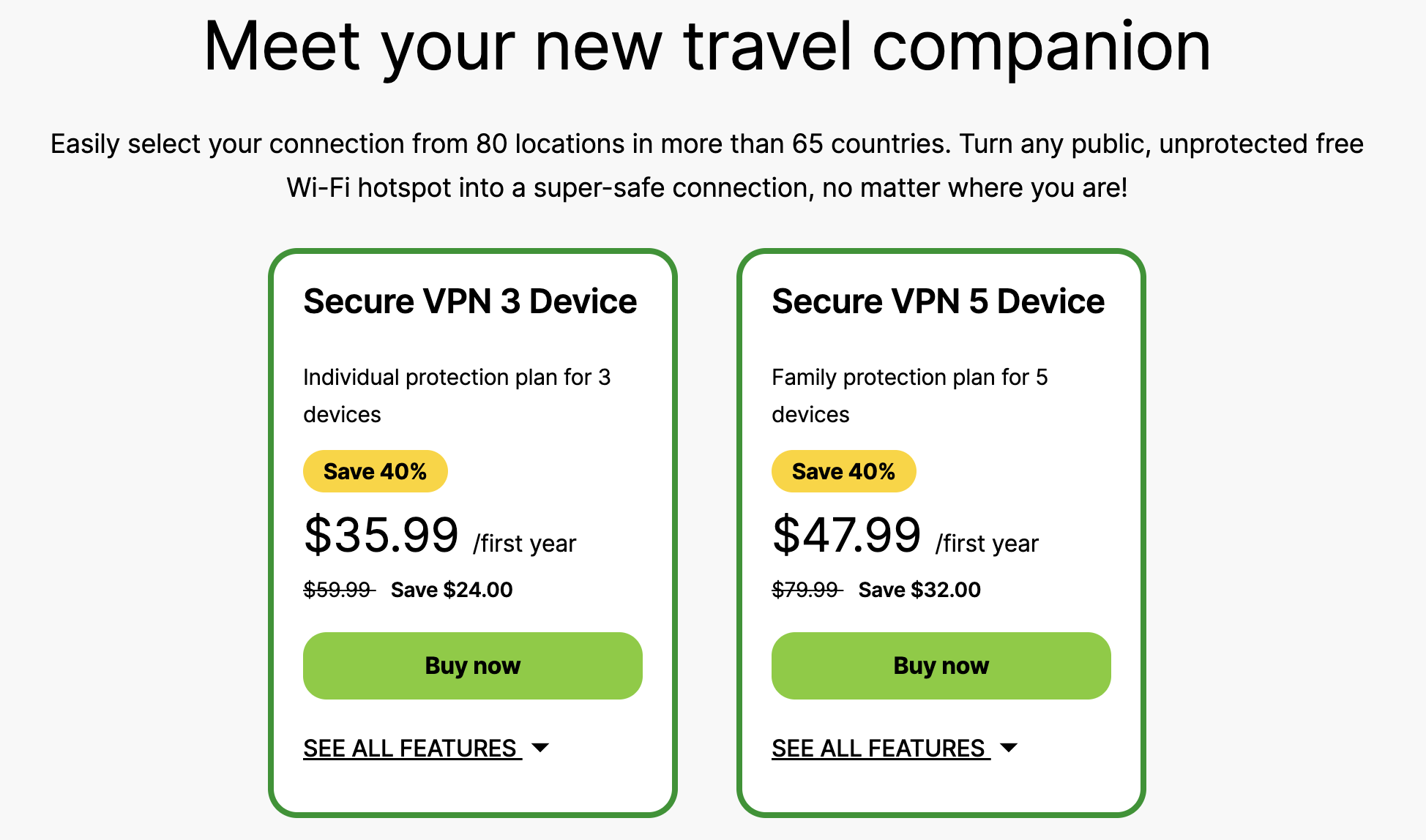
The price for the provider starts from $35.99 to protect three devices for a year. In case you’re not satisfied with the number of simultaneous connections, get another plan allowing 5 devices. It will cost you $47.99.
When it comes to paying for the service, choose one of the following methods:
- Bank Cards: MasterCard, Visa, American Express, Discover Card, JCB Card;
- PayPal.
Unfortunately, there is no such option as paying with cryptocurrency.
Note: Some subscriptions begin with a free session. To avoid being charged using a Webroot free trial, you must cancel your subscription before it ends. Webroot doesn’t offer a money-back guarantee.
Info on servers in different countries
New Webroot WiFi Security offers connections to 65+ countries of your choice. Among them servers in the UK, the USA, Canada, Russia, Cyprus, the Netherlands, Norway, Sweden, Switzerland, Spain, Singapore, Thailand, and other countries.
If you use some of the servers regularly, it will be convenient to ‘favorite’ such locations. They will be shown at the top of the location server list.
It is also possible to select the “Automatic” connection, it allows the app to choose the best location according to your current IP.
Security and Privacy
On the Webroot WiFi Security Privacy Statement, it is noted that the company doesn’t collect or log any browsing activity, IP addresses, DNS queries, or shared/viewed data. However, minimal usage statistics are saved to maintain a quality of service. Stay cautious and read the privacy policy carefully.
As for protocols and the encryption method of the provider, they are up-to-date. However, we haven’t found any information about OpenVPN. It seems this protocol is not supported by Webroot WiFi Security. In the settings of the Webroot VPN application, you can choose from:
- IKEv2;
- L2TP/IPsec;
- PPTP.
What is really important is that the VPN uses the most robust encryption – AES 256-bit encryption. It’s considered to be the most reliable and trustworthy today. It proves that the company takes the issues about security and privacy seriously.
Webroot customer service
You may well face some technical issues even with the best VPN applications. That’s why it’s vital to have the possibility to contact the Webroot team at any time. Fortunately, there are a lot of ways to get a hold of them. First, you can submit a ticket on the official website, webroot.com.
Such options are also available:
- Find an answer using Webroot's interactive knowledge base;
- Send a message for support;
- Call a customer support representative.
Note: You can contact Webroot via call during Webroot business hours in Denver, Dublin and Sydney.
Client Account procedures
We’ve spent a few minutes getting the VPN on our Windows desktop. The process is easy and even intuitive. First, you have to create a Webroot account. You can do this on the official website. Just fill in a form with the necessary information. However, if you have already had a Webroot SecureAnywhere Console Account or want to change your password, it’s better to read this information.
Confirm authorization on your email and download Webroot WiFi Security on your device. Then, enter your password and username once again to access the app. Find a server you want to connect to, and that’s it.
IP Leak test and speed test for Webroot WiFi Security
We’ve connected to the server in France and decided to test the location for IP leaks and speeds. It is interesting to know what our IP address is.
The results are the following:
- No IP leaks detected. Our location is Paris, and the IP corresponds to the provided address by the VPN.
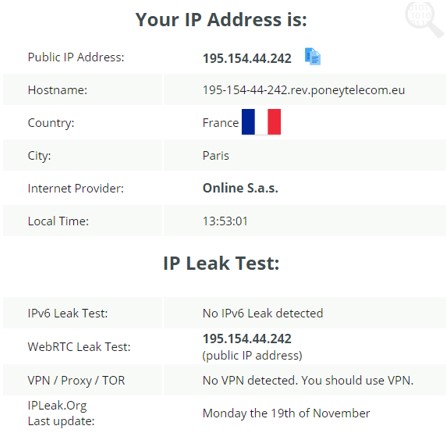
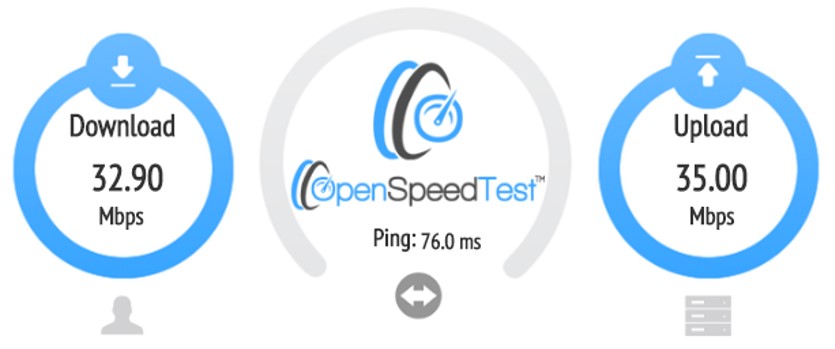
- Webroot WiFi Security hasn’t reduced our speeds significantly. The first screenshot shows the speeds without the VPN.
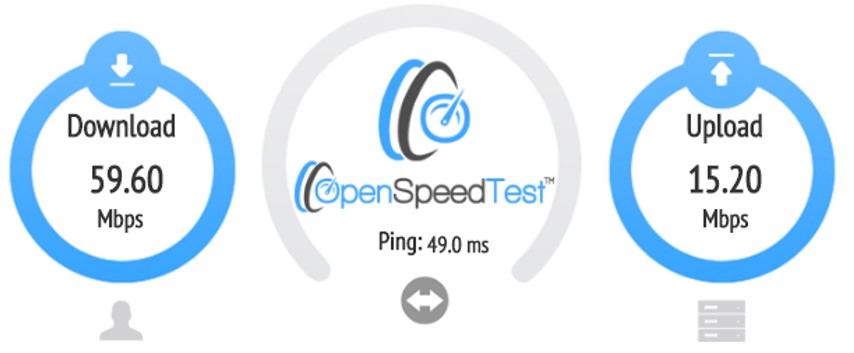
The second – with the running application. As you can see, the speeds are satisfying. 32.90 Mbps will allow you to stream music and HD videos, play computer games online, and many others.
Platforms
Unfortunately, Webroot WiFi Security works only on the most popular platforms, such as Windows, Mac, iOS and Android. If you need the best VPN app for Linux or configure a VPN on a modern router, you have to choose another provider.
Functions of Webroot WiFi Security
If you still ask yourself “Do I need a VPN?”, look at other functions of Webroot WiFi Security:
- Unlimited data access;
- Protection from malicious websites (available only on Android, Mac and Windows);
- Safe and secure browsing;
- Auto-connects on insecure Wi-Fi networks.
The VPN uses Webroot BrightCloud Threat Intelligence. Such feature classifies web pages to reveal hidden relationships between URLs that signal untrustworthy and malicious websites. In other words, Webroot WiFi Security prevents consumers from visiting risky pages and protects usernames and passwords against any third-party.
Summary
Webroot WiFi Security was specially designed to protect customers against malicious threats. The software is able to prevent financial and identity thefts. Moreover, the VPN hides your IP addresses and encrypts data to keep you safe on the Web. A Webroot WiFi Security mobile app automatically detects when you’re browsing on a suspicious page - even if you haven’t signed up for anything, and all you did was just download the app. We think this function is extremely convenient and useful. The provider does not offer refund if you have bought the software through Webroot. However, for app store purchases, regular app store refund policies apply.
We encourage you review these Webroot WiFi Security pros and cons when making your purchasing decision.
Advantages of Webroot WiFi Security:
- Free trial;
- User-friendly applications;
- No logs;
- Robust encryption;
- Simple setup;
- Decent speeds;
- BrightCloud Threat Intelligence.
Disadvantages of Webroot WiFi Security:
- Cryptocurrency is not available as a payment method;
- Runs only on Windows, Mac, iOS and Android.