What’s My IP Address
Caution! You are not protected! A VPN can mask your public IP address from websites and ISPs and help limit visibility into your browsing activity. If you’re unsure where to start, read our hide my IP guide to learn how a VPN can help protect your privacy online.
- Hostname
- Looking up…
- Location
- Looking up…
- ISP
- Looking up…
- System
- Looking up…
- Browser
- Looking up…
- WebRTC leak
- Looking up…
- Time
- –
What do you need to know about your IP address?
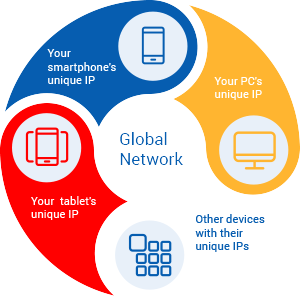
Once a gadget "goes out" to the global network, it is assigned with the unique number that indicates the geo-location of the gadget’s owner. It contains a certain combination of numbers which is individual for all network visitors. This number that serves to uniquely identify is called an IP address.
What is it for? That’s simple!
In order to perform connections between the rest of the digital world, one is required to have an IP address assigned by an Internet Service Provider (ISP). It’s worth noting that they should be personal, individual for all netizens.
As you can see from the image below, all gadgets are connected in the following way:
What are Internet Protocol versions?
Currently, there are two types of Internet Protocol versions that coexist together: IPv4 and IPv6. The latter is an advanced version of IPv4.
IPv4 vs. IPv6: what’s the difference?
IPv6 was designed as the number of IPs available according to IPv4 version is limited enough, and one day it may fail to fulfill the needs of the growing number of internet users.
There are several characteristics that will help you to understand how these two IP versions are different:
- 1) IPv4 is a 32-bit address, while IPv6 is a 128-bit one.
- 2) IPv4 is written in decimal, and IPv6 address - in hexadecimal.
- 3) IPv4 is separated by periods, but IPv6 - by colons.
Reasons to hide my IP address
If you care about your digital privacy, you’d better think of an easy IP lookup tool:
Your personal IP address will tell you about:
- City/Town
- Country
- State/Province
- ZIP code
But that’s not all …
Every time you go to the sites on the network, they might collect lots of extra personal or non-personal data about you. Where is it taken from? From cookies and different trackers. On the basis of the abovementioned data stored, quite a detailed profile may be created about users of the network.
Why do websites gather it?
It is usually necessary for them to know what kind of advertising to show you. Besides, some of them are believed to sell personal data to third parties.
As far as Internet Service Providers are concerned, they are able to collect far more personal data about you.
What can ISPs know about you?
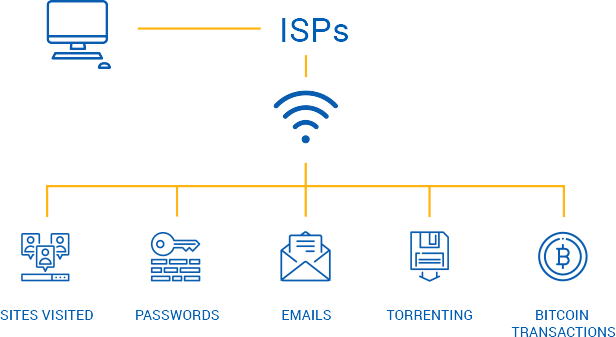
Moreover, in some countries ISPs are obliged to track their users’ online activity and keep the data for a month or more. Is it enough to start hiding IP from ISPs with VPN?
Reasons to hide my IP address
Every time you go to the sites on the network, they might collect lots of extra personal or non-personal data about you. Where is it taken from? From cookies and different trackers. On the basis of the abovementioned data stored, quite a detailed profile may be created about users of the network.
What is more, your IP location identifies your real geo-location that will reveal your identity to cyber hackers. It’s sure that you don’t want them to know so much about you, do you?
Thus, keep on reading to know how you can hide your IP from anyone, even your ISP.
How VPN hides my IP
VPN providers have servers at their disposal. They are located in different countries around the world. When netizens are linked to Virtual Private Network, real location becomes different, it is changed in a virtual sense.
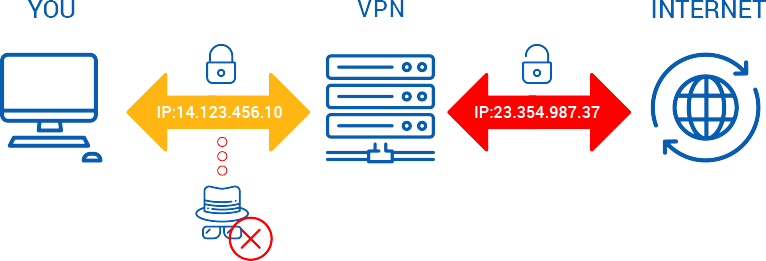
In such a way you may hide your IP with VPN:
- You are connected to VPN.
- True IP is changed and becomes invisible for your ISP and others.
- VPN’s IP address is seen on the net.
But is that all? No!
- VPN encrypts all the traffic that goes through the Internet.
- VPN servers can be switched to change IP addresses several times during one session on the network.
More detailed information in Hide my IP Guide!
Don’t forget to check IP with our tool! Be sure VPN software works perfectly and doesn’t leak IPs!
What’s DNS and its leak to the network?
For determining the way to the ‘’path’’ to servers used to keep the sites usually visited by you, DNS was created.
Surfing the Internet with VPN protection, your device will take use of DNS-servers suggested by your Internet Service Provider. Unfortunately, internet snoopers are able to catch this information in order to track what sites you visit and what apps you use.
Learn more about Domain Name System from the video.
How DNS leak happens
When you protect your website visits with VPN software, your aim is to conceal your data against prying eyes of the network. The information (it includes DNS requests as well) is transferred via VPN tunnel to VPN’s servers, not to ones of your ISP. But sometimes there are errors in the system…
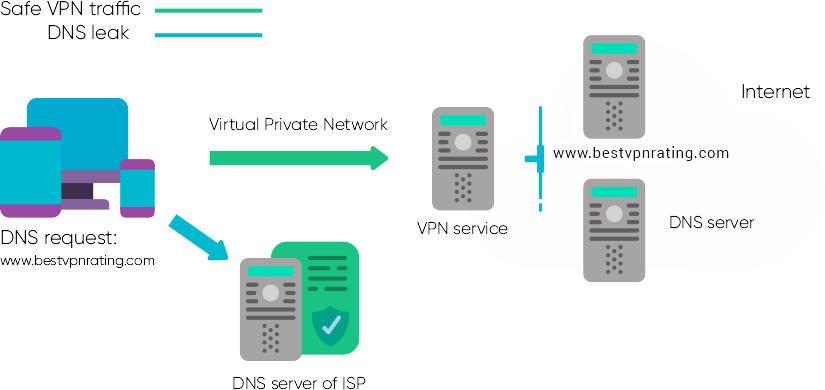
You may fall victim to DNS leak if you DNS servers of your ISP receives all the requests from you, but not your VPN provider. Why does it happen in such a way?
- VPNs configured manually.
- VPN failure and DNS requests are redirected to outside the tunnel.
- VPN providers doesn’t have own DNS servers.
How DNS leak may influence you?
In case of internet traffic going via the route which is not correct (with no encryption), the information can be easily caught by third party agencies. The intercepted data will include:
- visited sites
- downloaded files
- used services
How to check DNS leak?
Go to "What’s my IP" page.
Conduct IP check test.
What IP do you observe: real one or the one assigned by VPN?
If you see your true IP…
Sorry, but it is DNS leak.
You see the location and IP address of your VPN provider…
Keep calm and relax!
You must remember that:
Free VPN services and some paid untrusted ones aren’t the services to rely on. DNS leaks are quite often situations when low-quality services are applied. Be sure that you take use of VPN which is reliable as regards DNS leak protection.
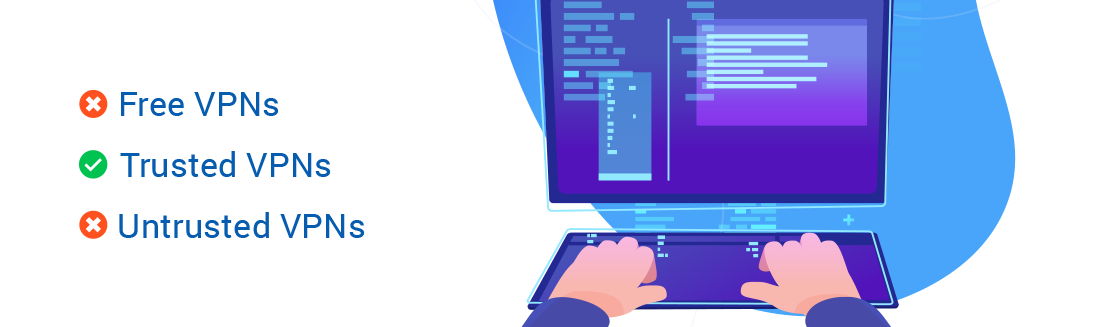
If you are still in search of VPN or your current service fails with DNS leak protection, look through the list of all VPN services.
Why to hide your router IP?
What are routers?
Routers are applied for accessing global network. For the reason of possible virtual attacks that sometimes occur, you’d better be aware of your router’s IP address.
Here we’ll tell you where and how to find IP addresses of routers that work on various operating systems: Windows, Mac, Android and iOS. What is more, you will learn why you should use a VPN for routers.
Got interested? Let’s dive right now!
How to find my router IP?
The way you can find your router IP depends on the platform. Have a look at the steps below to find router IP addresses:
Windows:

Mac:

IOS:
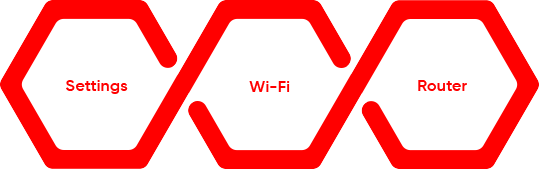
Android:
With the help of Wi-FI Analyzer (Can be downloaded from Google Play)
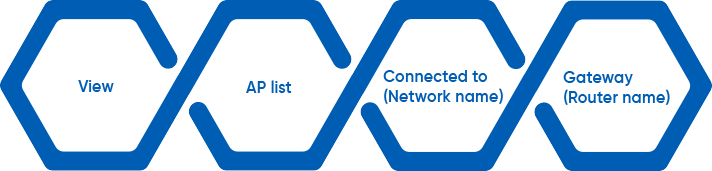
Why to use VPN for routers?
As routers are sometimes attacked, you should think of protecting them with VPN services for routers. Attacks on routers can take place in the following way:
- 1) DNS settings are changed
It takes place when your DNS request is redirected to the malicious site because of virtual attacks. In most of such cases you might not even suspect any "malicious" behavior from the website. - 2) Getting infected via ads
In case you are shown ads while visiting websites, and they seem to be strange and unknown for you, your router is probably infected via ads. - 3) Harmful Javascript
The mentioned above malicious javascript is usually imbedded via the administration page of your router.

Having configured a VPN service on your router, it is easier to be protected on the Internet as you don’t need to install VPN software on all your devices. VPN for routers make all your internet connections encrypted and protected against hacking attacks. No matter what device is connected to Wi-Fi network (smartphone or PC), DNS requests that go from them are passed via VPN tunnel.
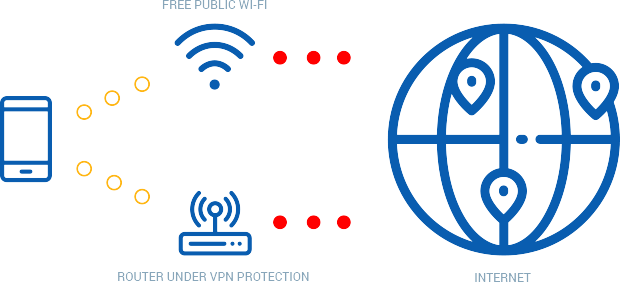
You can read even more about VPN for routers in our dedicated article.
How to do torrent IP check test?
Have you ever downloaded torrents via BitTorrent protocol? Then you know what Bittorent is. In case the word is new for you, read on this page. As you know now, this protocol made it easier to share heavy files over the network.
Here is a short video to learn more on the issue discussed:
What is torrent IP?
Users’ IP addresses are visible to leechers and seeders of torrent networks, when torrent files are shared. Such IP addresses are called torrent IPs.
Thus, torrenting out of VPN is not secure as every user of torrent websites will see the IP of your Internet Service Provider. Sharing torrents via VPN makes you not only anonymous, but also gives you more privacy as your true IP assigned by the ISP is hidden from prying eyes.
Why to hide IP when sharing torrents?
It doesn’t matter what torrents are shared on torrent trackers, you might not even know if they are copyrighted or not, it is necessary to "put on a mask" on your real IP. It’s better not to ignore using it so that not to be tracked by ISPs and other third parties.
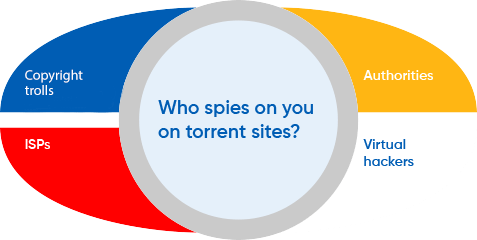
The picture above shows that not only ISPs may monitor you. As far as copyright trolls are concerned they may do this on their own or being hired by copyright owners to define internet users who may abuse copyright laws.
Possible outcomes of being monitored by third parties:
- Such internet users are throttled
- Access to torrent sites is often blocked
- Warning notes are also sent by copyright trolls
Sometimes torrent users receive warning letters accidentally and pay fines not to be sent to court, even if they aren’t guilty!

Check torrent IP : How such tools work
You might think that checking torrent IP is almost the same procedure as just checking your router IP. That’s not true. It is quite different. Remember that you can check your IP right here on our website.
Such free tools as IPMagnet or checkmytorrentip.upcoil.com can be applied for these matters.
Don’t forget that:
- Torrent IP check is performed in the torrent client used by you.
- IPs in your browser and torrent client are subjected to comparing.
Follow the instructions and and check torrent IP with the help of abovementioned tools:
Creating of a tracking link
Browser and torrent client IP comparison
Checking of connection data in the torrent client
1) Press "Download Magnet Link" and create a tracking link. Then it will be opened in your torrent client.
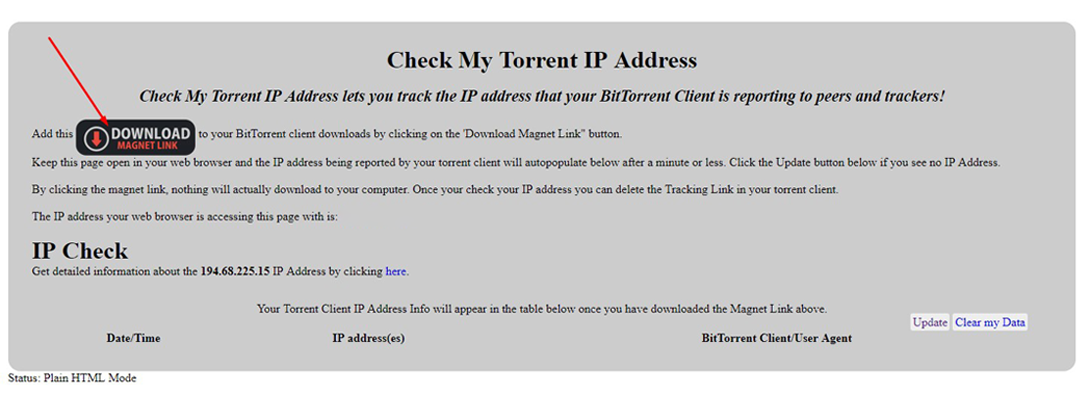
2) Check what IP you see in the browser and torrent client. They shouldn’t be those assigned by your ISP!
3) Launch your torrent client and check your torrent IP. Click the tracking torrent, then go to Trackers tab and have a look at the connection data.
How the data should be analyzed after torrent IP check?
- Do you see your VPN provider’s IP address? No reasons to worry about.

- In case of other results, try another test. Is it still your real IP? Then you are not protected!

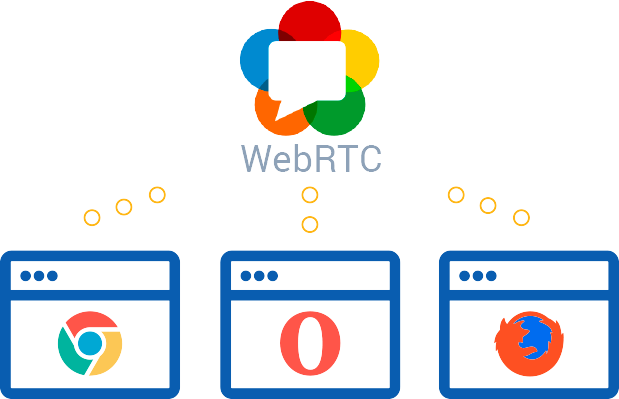
What is WebRTC?
Every year more and more people are involved in internet surfing. By the moment such modern gadgets as smartphones are used even more than just a few years ago. All these facts influence the quality of online communications. WebRTC is aimed at improving real-time communication online.
WebRTC is an open multimedia real-time communication standard integrated in browsers. As it is a platform with an open standard, there is no need to download other software solutions or extensions.
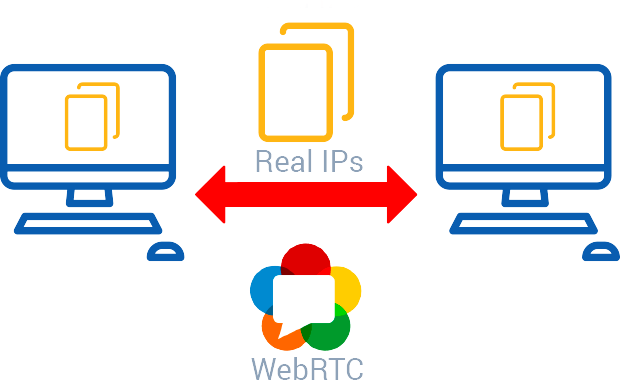
The technology is integrated in such popular browsers as Google Chrome , Mozilla Firefox and Opera.
What is WebRTС leak?
In order to perform real-time communications directly through WebRTC platform, devices have to know IP addresses of each other. It is believed that third parties might misuse this technology to intercept your IP which identifies you.
You should know that there are public and local IPs that are served to identify different information. When one is linked to the network via VPN, the public IP of the VPN’s server is identified. So it is safe for you, even if hackers intend to misuse it.
Want to know more about WebRTC?
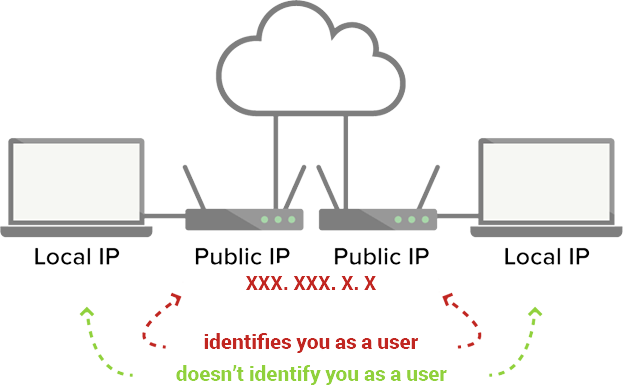
As far as local IPs are concerned, they do not reveal anyone who you are. They are assigned to millions of routers and have nothing in common with your virtual identity.
If WebRTC leak test shows your true public IP, not VPN’s. You are not protected then. Such a VPN does not defend against WebRTC leaks!

What users are susceptible to WebRTC leaks?
Most of you surf the Internet via widely-spread browsers mentioned above (Chrome, Mozilla Firefox and Opera). WebRTC technology is applied in them by default, their mobile browser versions do not support it now, but in the very near future it seems they will use WebRTC as well.
How to identify WebRTC leak with VPN?
First and foremost, check your IP address on "What’s my IP" page and have a look at the results. In case IP address of your VPN provider is seen, then everything is ok.
In case your real IP address is identified by our tool, follow the steps below:
Turn the VPN off.
Open My IP page again and take notes of the public IPs.
Turn the VPN on and repeat a check test.
What do you see now? VPN provider’s IP? Or your public IP?
If the latter is your answer, it is WebRTC leak!