Before getting down to the ExpressVPN review, I went through dozens of sources online and still couldn’t find practical information all in one place that works for both beginners picking their first VPN and experienced users considering a switch. ExpressVPN has also changed a lot lately. It now sells tiered plans that include a password manager, email masking, and identity protection on top of the VPN itself, so older reviews no longer tell the full story.
Almost everyone calls ExpressVPN one of the best VPN services, praising its security, its fast Lightway protocol, and its streaming performance. Other providers have caught up on streaming, though, and the price is higher than average.
So I decided to run the tests myself and check what the service claims against what independent experts say.
Here’s the plan. First, I’ll walk through installing and setting up the app on PC and smartphone, step by step. Then, I'll run special checks, analyze all data, review pros and cons of the service, and finally make an expert evaluation.
1. Step-by-step installation of ExpressVPN Software
As usual, I'll use a Windows PC for my tests and an iPhone to check the work of a VPN on a smartphone. Software installation on macOS and Android is similar. Here’s how to install ExpressVPN pn desktop or mobile devices.
1.1. ExpressVPN installation on Windows or Mac
- After buying a plan, log in to my ExpressVPN account and open the setup page.
- Under Applications (or Show other devices), click Windows, then Download Now.
- Leave this page open, because it also holds your VPN Activation Code. Click the copy icon next to it.
- Double-click the downloaded file and click Yes when prompted to allow changes to the device.
- The app installs and opens by itself. Click Sign In. There are three ways to sign in:
- Email sign-in link: enter the account email, click Email My Sign-In Link, then open the email on any device and select Sign In to ExpressVPN.
- Password: click Sign in with Your Password and enter the email and password.
- Activation code: click Sign In with Activation Code, paste the code you copied earlier, and click Sign In.
The app then asks three things: whether to launch ExpressVPN on startup, whether to share anonymous diagnostics, and (if the plan includes advanced protection) whether to block ads and enable extra safeguards. Choose your preferences each time.
On the main screen click the power button – ExpressVPN app will pick the optimal location by default, and when it says Protected, you’re connected. Ready!
For full instructions, check the ExpressVPN setup guides: Setup for Windows 10 and above or Setup for macOS 11 and above.
1.2. ExpressVPN installation on a smartphone or tablet
The app supports iPhone and iPad on iOS 15 and above, and is available on the App Store for iOS or Google Play for Android. Here’s how to set it up:
- Open the App Store, search for ExpressVPN, tap Get, then Open.
- On first launch, accept the Terms of Service, choose how much data to share, and tap Sign In. ExpressVPN is rolling out new sign-in options gradually, so you may see these or only the legacy ones:
- Email code: enter the account email and then the verification code sent to it.
- Login token or QR code: copy the token from the setup page of the ExpressVPN portal (Show other devices > iPhone, iPad & iPod), or tap Scan QR code and scan the code in the portal or in the desktop app (Go mobile). This is the fastest way if you’re already signed in on your PC.
- Passkey: enter your email and follow the prompts, if you created a passkey at signup.
- Legacy sign-in: enter your email and password or activation code, or tap Restore your App Store subscription if you bought through the App Store.
- Tap Continue.
- When iOS shows “ExpressVPN” Would Like to Add VPN Configurations, tap Allow (and enter the passcode if asked). Without this the setup fails.
- Choose whether to enable notifications.
On the home screen, tap the power button – it connects to the Fastest Location by default. When it says Protected, it means ExpressVPN is on.
2. Check out the Internet claims
2.1. Easy to install and use
I've been delighted to install the ExpressVPN app on all gadgets so fast, easy, and fail-safe. Due to the detailed hacks highlighted in the email, it'll be dead easy for people who decide to use a VPN for the first time to handle the software installation.
I was pleased to see that the app recommended the location upon the first start-up after installation, and all I needed to do was tap on the power button of the VPN. The list of countries is divided into groups in the most handy way. It allows you to choose the country you need and the region inside it quickly.
Location speed testing is conveniently integrated. For as long as I was carrying out tests, which would be presented further, the app didn't hang up, didn't back off, and didn't shut down itself.
It is especially great for iPhone, as the apps in standby mode are often force-closed.
I have found a very useful setting, split tunneling, which allows for the app can be configured so that not all programs use the VPN.
Conclusion: Is it easy to install and use? – A definite YES!
2.2. Incredible speed
Speed is the other thing that decides whether a VPN is pleasant to use, and ExpressVPN now builds its connections around Lightway, its own protocol designed for fast, stable connections. Unlike older versions, there’s no need to pick an encryption method by hand: the app’s Automatic setting chooses the protocol that suits your network.
To see how it performs, I first measured my connection without a VPN at 940Mbps download, then connected to servers in three countries. The UK server, the closest to me, came in at 840Mbps, which is 89% of my baseline speed. The US server reached 793Mbps (84%), and Australia, the furthest away, delivered 693Mbps (74%). The drop-off is what you’d expect, since the further the server is from you, the more speed you lose.
Even the slowest result is many times what 4K streaming needs, so ExpressVPN is quick enough for streaming, gaming, and large downloads from any of the locations I tested.
Is the speed of ExpressVPN servers awesome? It is just very high. I've taken dozens of tests on some more servers across the world, but haven't found one where ExpressVPN’s speed would be poor.
2.3. Offshore privacy protection
ExpressVPN’s privacy policy says the service operates under British Virgin Islands law, and the company is registered there. The appeal of an offshore base is that the company isn’t directly bound by the data-retention rules or legal pressure of the countries where most of its users live.
The ownership picture is no longer a mystery: Kape Technologies bought ExpressVPN, and Kape has been privately held since 2023. Some privacy-minded users are wary of Kape because of its adware roots and because it also owns other VPNs and some VPN review sites. ExpressVPN says it continues to run independently with its own team. I mention this so you can weigh it yourself.
What matters most is how a VPN behaves when authorities come knocking, and ExpressVPN has a real example. The Russian ambassador to Turkey was assassinated in December 2016. In January 2017, Turkish investigators seized an ExpressVPN server that they say was used to delete the attacker’s Gmail and Facebook accounts. They found no logs, and the case became public in December 2017. ExpressVPN has since stopped running physical servers in Turkey, and its Turkish location is now virtual, hosted in the Netherlands. Today its servers run on RAM only, so data is wiped on every reboot, and its no-logs policy has been independently audited.
So does ExpressVPN’s privacy protection hold up? Based on this evidence, yes. The offshore registration is only part of the reason, and the RAM-only servers, the audits and the Turkey case are the better proof.
2.4. Strong security level
I’ve already mentioned that the ExpressVPN app offers different connection protocols and that Automatic is selected by default. So what does the service use in practice, and how well does it protect sensitive data from interception? For most connections, Automatic now picks Lightway, ExpressVPN’s own open-source protocol. ExpressVPN uses AES with 256-bit keys (AES-256) to encrypt traffic. Here’s what that means:
- AES-256 is a US federal standard, and the NSA has approved it for protecting TOP SECRET information.
Lightway uses AES-256-GCM, which is hardware-accelerated on most modern devices, so it doesn’t cost much speed. On low-powered routers and entry-level phones it may switch to ChaCha20-Poly1305.
Strong encryption alone isn’t enough, so the protocol itself has to be trustworthy too. Lightway is built on the wolfSSL cryptography library, and independent security firms Cure53 and Praetorian audited the current Rust version of the protocol in 2024 and found only a few low-risk issues, which have since been fixed. Lightway also includes post-quantum protection by default, using the NIST-standard ML-KEM algorithm, so traffic recorded today shouldn’t be readable by future quantum computers. For those who prefer OpenVPN, ExpressVPN uses 4096-bit RSA keys, a big step up from the 1024-bit key it was criticized for back in 2016.
To check this in practice, I ran leak tests on a PC and ExpressVPN prevented all three types of leak: IP, DNS and WebRTC. My real IP address and country stayed hidden. On a smartphone, I switched between mobile and Wi-Fi networks and moved through areas with weak signal, and the app reconnected without exposing my traffic.
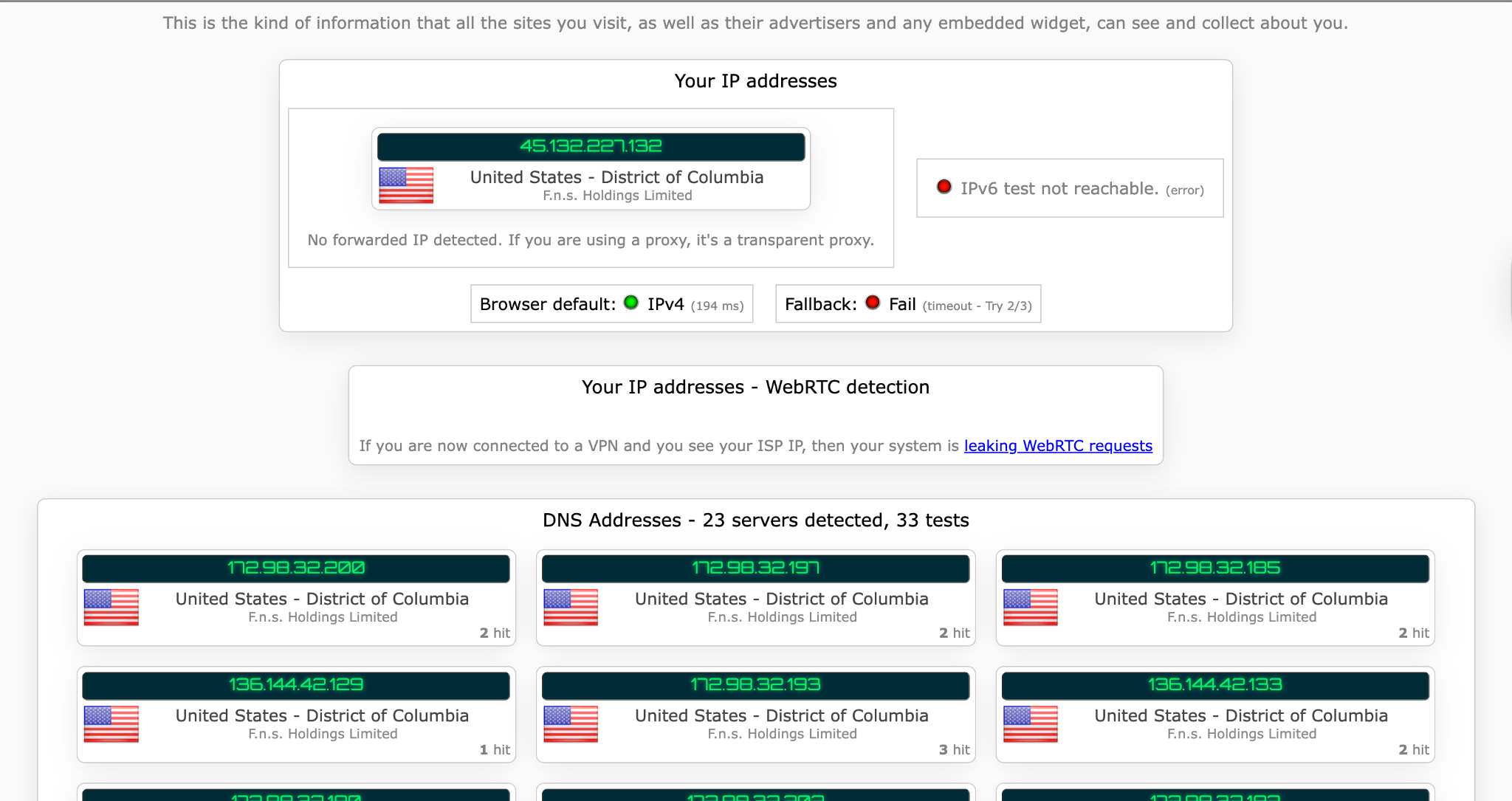
Taken together, this is the strongest security setup in this review: modern encryption, an audited open-source protocol, post-quantum protection and leak prevention that worked in my tests.
2.5 30-day money-back guarantee
ExpressVPN backs every plan with a 30-day money-back guarantee, whether you pick the monthly, 1-year or 2-year option. The 30 days count from the date you buy the plan, not from when you register. The company also says it’s “no questions asked”, which shows real confidence in the service.
Getting a refund is simple, but you have to ask for it, because cancelling alone doesn’t return your money:
- Open the 24/7 live chat on the ExpressVPN website and ask for a refund under the money-back guarantee.
- The agent may ask why you’re leaving and try to fix any problem first. If you still want the refund, they’ll process it.
- You’ll get a confirmation email, and the money returns to your original payment method within 5 to 7 business days.
There are two things to watch for. The window is exactly 30 days, so don’t leave it to the last day. And if you bought through the Apple App Store, you need to request the refund from Apple, not from ExpressVPN.
Because the guarantee gives you full access to the real product for 30 days, it works as a risk-free trial. Another advantage of ExpressVPN confirmed!
2.6 Large number of servers in many countries worldwide
In this ExpressVPN review, I want to explain why the number of server locations matters for a VPN service.
Firstly, it gives you the choice of an uncommon location. Almost every VPN provider offers servers in the USA and Germany, but what if you need an IP address in a smaller country? ExpressVPN has servers in 113 countries, covering 214 locations, which is far more than most competitors. There are 195 countries in the world, so that covers more than half of them.
Secondly, the closer a VPN server is to your location, the higher the speed is. ExpressVPN will recommend the most suitable server, taking into account your geo-location, even if it’s hard to decide on the best route of connection.
There’s another reason why a large number of servers is considered an advantage. Every day, millions of people around the world use VPN. That’s why the larger the number of locations a VPN service offers, the more evenly the users are distributed, and the server load is spread more evenly as well. Thus, the quality of a VPN service is improved.
ExpressVPN is not the best in terms of the number of countries, but it is absolutely among the leaders.
2.7. 24-hour live chat support
It’s not easy to imagine the situation in which you would need ExpressVPN’ s customer support. All possible difficulties are covered and described in detail when installing, configuring, or using the software. I have been using the service for a long time and making notes for this review. But once I had a problem. When I was trying to stream on Netflix, I received the following message:

It was a weekend, moreover, nighttime. But I kept in mind ExpressVPN’s claims about 24/7 customer support. I contacted customer support via online chat, and a representative replied immediately. They asked about the details of the problem and recommended using another VPN server for watching Netflix. It took a few minutes, after which I managed to revive the stream.
That’s incredible!
2.8. No activity logs, no connection logs
I’ve already described the incident in Turkey, where authorities seized an ExpressVPN server and found no user data on it. So what is the best proof of ExpressVPN’s claims today? In my opinion, it’s the independent audits. PwC checked its privacy policy and TrustedServer technology in 2019, and the accounting firm KPMG has audited it several times since, most recently in February 2025.
KPMG found reasonable assurance that the servers don’t collect browsing history, traffic destinations, data content, DNS queries or connection logs. The servers also run on RAM only and wipe all data on every reboot, so there’s nothing stored for anyone to seize. One caveat is that the latest KPMG audit is a point-in-time check, not a long-term test, so it’s best read together with the earlier audits and the Turkey case.
What does ExpressVPN actually collect? Account and subscription details, such as your email and plan dates, plus a small amount of usage and diagnostic data to keep the service running. App diagnostics are only shared if you opt in, and the app asks you during setup. None of this shows which websites you visit or what you do online, so it can’t be used to track your activity.
2.9. Apps for most platforms
Just have a look at this!
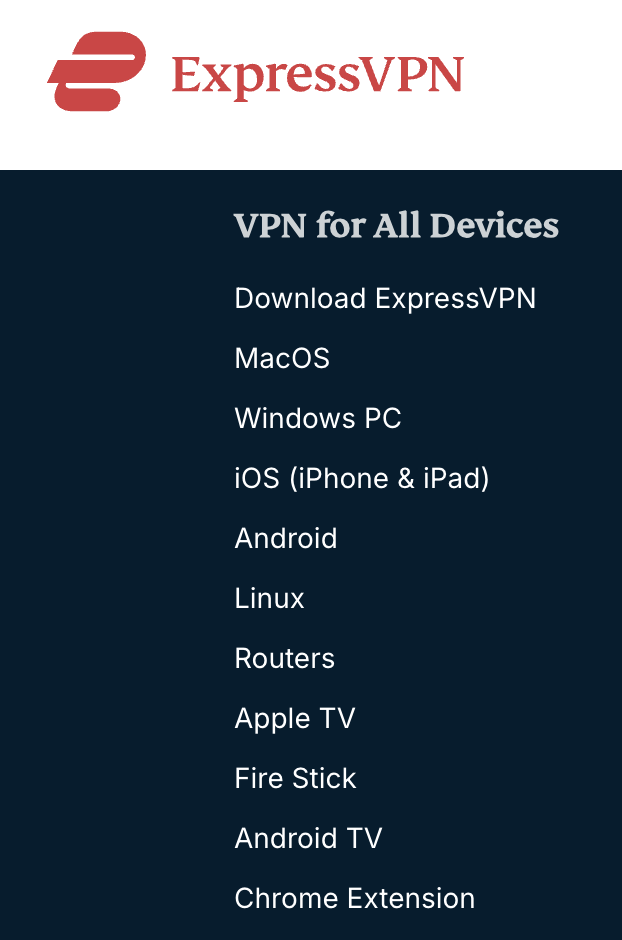
That’s why ExpressVPN is one of the best VPNs on the market today. Try to find an internet device that is not included in the list above. If you do find it, Manual Config will help you to configure a secure and anonymous connection to the network.
Perfect!
2.10. Works with Netflix
It’s not a secret that many people look for the opportunity to use Netflix without regional restrictions. Netflix is aware of this and do everything they can to protect its policies. And VPN services compete for clients and try to find new tricks to unblock Netflix.
ExpressVPN is one of the few services that really solves this problem. Not all servers work with Netflix. I had to change locations many times to stream online. For the first time, a specialist from its customer support helped with it.
But, in my view, it’s easier to find the locations working with Netflix on ExpressVPN’ s list than on others’. I tested the US, the UK, and CA locations and found the servers that work with Netflix and don’t pop an error.
2.11. Unblocks Hulu, Amazon Prime, BBC iPlayer, and other streaming services
Everything I have told you about Netflix is relevant to other video streaming services as well. Having set up ExpressVPN, I managed to stream any video without difficulty.
Read further in our reviews:
- Best VPNs for Hulu
- How to watch Amazon Prime
- Best VPNs for BBC iPlayer
- Best VPNs for Spotify
- Best VPNs for HBO Max
- Best VPNs for Pandora
- Best VPNs for Freeform
That’s why I confirm that ExpressVPN is an excellent choice for streaming.
2.12. Supports P2P (torrenting)
Not every VPN is suitable for torrenting. Some don’t promote P2P support and some restrict it. ExpressVPN has a clear answer: torrenting is allowed on all its servers, so there are no special P2P-only servers to hunt for.
The Internet Kill Switch is on by default and blocks your traffic if the VPN connection drops, so your real IP address isn’t exposed to other peers in the swarm. Together with the no-logs policy and RAM-only servers, that makes a solid setup for torrenting.
One of my first tests for ExpressVPN was a torrent check. I tested several locations and confirmed that using ExpressVPN with P2P is efficient and secure.
3. Check out the cons
3.1. A bit expensive
When I saw the monthly price for the first time, I thought ‘’Really?’’
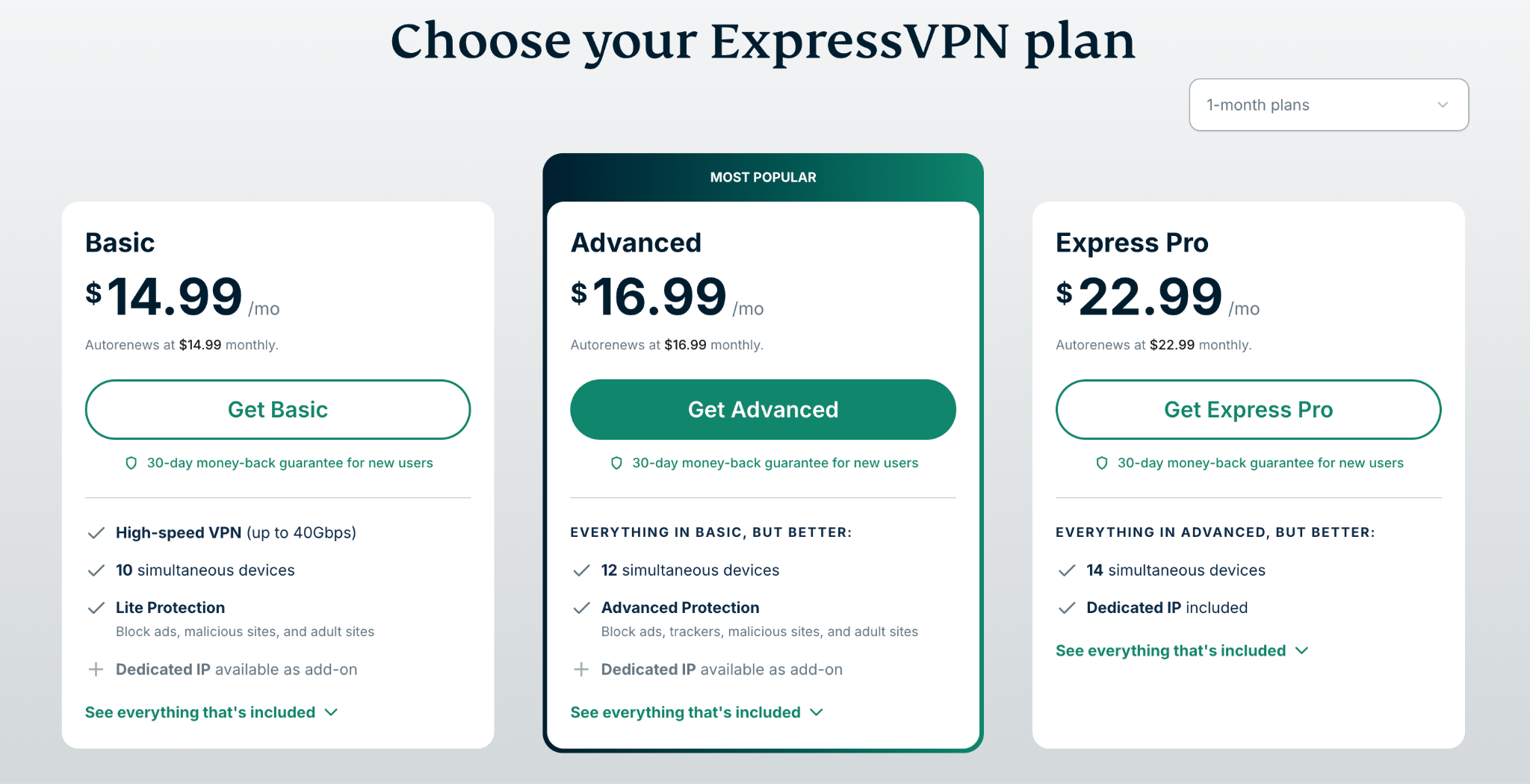
It’s sure that the company is trying to promote a 2-year subscription that lets you save 80% and costs $2.99 per month, with 4 extra month included for free. Still, $14.99 per month is expensive for those who can’t afford to pay about $100.00 upfront at once.
Let me point out that during the first month, you can refund your money with no questions asked. I have chosen a 2-year subscription for $2.99 per month and am pleased with the quality of ExpressVPN services and its no-logs policy. That’s why I didn’t cancel the subscription and have been using this VPN for work and my personal needs so far.
3.2. Limited simultaneous connections
I know that there are VPN services allowing unlimited simultaneous connections. But in my experience, 10–14 simultaneous connections ExpressVPN offers, depending on the plan you choose, are more than enough. Usually, I use only two connections: my PC and smartphone. That’s why it’s not a disadvantage for me.
But if you need to connect more devices, I recommend setting up a VPN on a router (that thing in the corner that distributes Wi-Fi). In such a case, any device connected to that network will go through the VPN tunnel. I can’t tell you how to do this in detail as the configurations are different for any other router. Still, a specialist or ExpressVPN’s customer support will definitely help you.
3.3. Advanced settings are a bit limited
For most users the limits are minimal, but power users will notice them. I’ve configured VPN servers many times, back when it was easier for my company to run its own OpenVPN than to rely on a commercial service, so I know what’s possible with manual setups.
ExpressVPN lets you pick the protocol (Automatic, Lightway, OpenVPN and others) but not the cipher or key length. It also has no multi-hop (double VPN) option, which routes traffic through two servers, and no port forwarding, which some torrent users would want.
The extras it does offer also have limits. Lightway Turbo can’t be combined with split tunneling, and on iPhone, split tunneling only works with IP addresses, not apps. If you need that level of control, competitiors give you more options.
For everyone else, I’d recommend leaving the protocol on Automatic.
4. Conclusion. Expert recommendation
As you can see, ExpressVPN is one of the best VPN services. It’s time-tested, and it’s undoubtedly one of the leaders on the market. I’ve checked its pros and cons, conducted additional complicated tests, and I’m pleased with the results. As an expert, I believe that the usability of ExpressVPN’s apps, verified no-logs policy, and excellent customer support are worth paying the money asked for its services.
I consider that ExpressVPN fits all. It’s very good for home use, including web surfing, streaming video, and torrents, as well for use on a smartphone, including VOIP, and other devices and companies concerned about the safety of their information.
So, is ExpressVPN worth choosing? Yes, of course.