Surfshark is an established VPN provider, but how well does it perform in everyday use? To find out, I installed its apps on my PC and smartphone and put it through hands-on testing.
I ran speed tests and IP leak checks, explored its security features, and assessed how easy the apps were to use. In this review, I’ll explain what worked well, where Surfshark fell short, and whether it’s worth your money.
Step-by-step installation of Surfshark software
Fortunately, all advanced VPN providers today offer software for various platforms. Some users, of course, prefer to set up a VPN manually. However, automatic installation is much more convenient and saves time.
As for Surfshark, it was dead easy to set up on both my Windows PC and Android.
Surfshark installation on Windows
- Download the Windows installer from Surfshark’s official website.
- Open the downloaded Surfshark.Setup file and click Yes when Windows asks permission to make changes.
- Wait for the installation to finish. The app should open automatically.
- Log in to your Surfshark account.
- Click Quick-connect to connect automatically, or choose a location from the server list.
Surfshark installation on Android
- Open Google Play, search for Surfshark, and install the official app.
- Open the app, tap Log in, and sign in with your Surfshark account.
- Tap Connect to use the fastest available location, or select a server location yourself.
- When Android asks permission to set up a VPN connection, tap OK.
- Check that the app shows an active VPN connection before you start browsing.
If you can’t access Google Play, download the APK directly from Surfshark’s official website rather than a third-party download site.
Check out the internet claims
As simple to use as turning on Wi-Fi
I was pleased to learn that the software is not only easy to set up but also to use. The app has a user-friendly interface. You may use the software in full-screen mode or use its mini mode. I had no problems while surfing the internet with Surfshark on. When I started using Surfshark, it recommended a server to me. I just taped the button to connect to the VPN server.
You can adjust features to your needs. For example, the MultiHop feature allows connecting via multiple countries at once. It gives a user an extra security level.
Is it easy to use Surfshark? Yes, very.
Kill Switch
Among numerous Surfshark features, there is a kill switch. This feature is extremely vital in case your VPN connection fails. In fact, it happens even with the best VPN services. However, if you turn on kill switch and your VPN drops out, your internet connection will not be available as well. As soon as I connected to the Surfshark VPN, I turned on kill switch to protect my data from leaks.
Kill switch works!
Secure protocols
Surfshark lets you switch VPN protocols under Settings → VPN settings → Protocol. You can select a protocol yourself or choose Automatic to let the app pick one for you. Available options vary by platform and include WireGuard, OpenVPN (UDP and TCP), IKEv2/IPsec, and Surfshark’s proprietary Dausos protocol. IKEv2 is no longer available in the Windows app.
WireGuard offers a good balance of speed and security for everyday use. OpenVPN provides two options: UDP prioritizes speed, while TCP retransmits lost packets for more reliable delivery. IKEv2/IPsec is particularly useful on mobile devices because it can quickly reconnect when you switch between Wi-Fi and mobile data.
Private DNS and leak protection
Surfshark uses robust protocols and AES-256-GCM encryption to guard customers’ personal information. It, of course, sounds impressive. However, it is not enough to encrypt the data. Customers should be confident that they are protected against IP or DNS leaks.
I’ve decided to check it myself and was glad to learn that no leaks were detected on both Windows and Android.
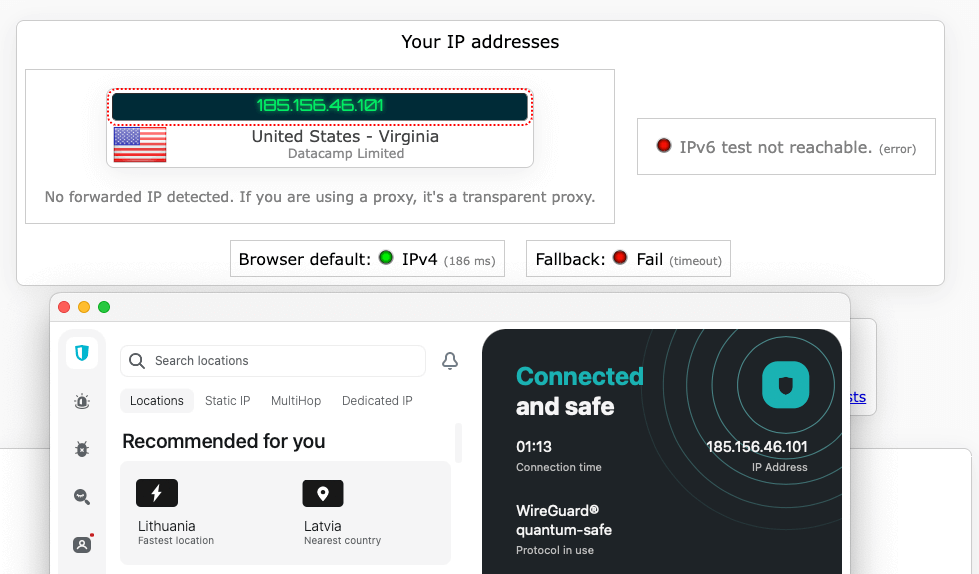
IP leak test is successful!
Strict no-logs policy
Like many other VPN providers, Surfshark claims to store no logs. However, I recommend viewing such statements as a key selling point and reading the privacy policy of VPN services carefully. The truth is, all VPN providers do keep some records.
So, according to Surfshark, the service collects the following users’ information:
- Email addresses for account management.
- Basic billing information.
- Diagnostics information/monitor crash reports on Surfshark apps.
To see if these statements are true, I surfed the internet with the aim of finding any scandals surrounding Surfshark. Fortunately, my extensive research was unsuccessful. I haven’t found any proof that Surfshark lies about its no-logging policy.
Another reason to trust the provider is its British Virgin Islands jurisdiction, which does not require data storage or reporting. The fact that Surfshark is away from the 14 Eyes alliance proves the company's reliability.
Is Surfshark reliable in terms of privacy? Yes, definitely.
24/7 expert support
There are two options to contact the Surfshark team: via live chat or open a ticket. Live chat seems to be more convenient, so I used it to get help. I was completely satisfied with their support. The answers weren’t copied and pasted; Surfshark’s customer support representatives really tried to help and answered instantly. Besides, I didn’t need to wait at all. The team answered immediately.
Fast response from the customer support!
Unlimited devices
Covering Surfshark features, I learned that the provider offers its customers support for unlimited devices. That’s good news for internet users who live with a large family. Just imagine how many devices will be protected with a single Surfshark account. Right, all of them.
The amount is only limited by operating systems, but Surfshark supports all the major one. The provider runs on Chrome, Mozilla Firefox, iOS, macOS, Android, Windows, Linux, and Fire TV.
You can protect as many devices as you wish at once!
30-day money-back guarantee
If you are a newbie to VPNs, it might be difficult to understand which providers will best fit your needs. A money-back guarantee gives you the possibility to test out the service and see if it is worth using or not.
Surfshark offers a 30-day money-back guarantee on your initial purchase. To request a refund, contact customer support within 30 days of payment. Canceling auto-renewal alone does not trigger a refund, and recurring subscription payments are non-refundable under the guarantee.
Some exclusions apply, including payments made with prepaid or gift cards. If you subscribed through Apple’s App Store or another unsupported reseller, you’ll need to request a refund from the original seller. Surfshark can handle eligible refunds for purchases made through Google Play, Paddle, and Cleverbridge.
Surfshark plans and prices
Surfshark offers three subscription tiers – Starter, One, and One+ – with monthly, one-year, and two-year billing options. Longer subscriptions reduce the monthly equivalent, but you pay for the entire initial term upfront. All tiers include the VPN and unlimited simultaneous connections.
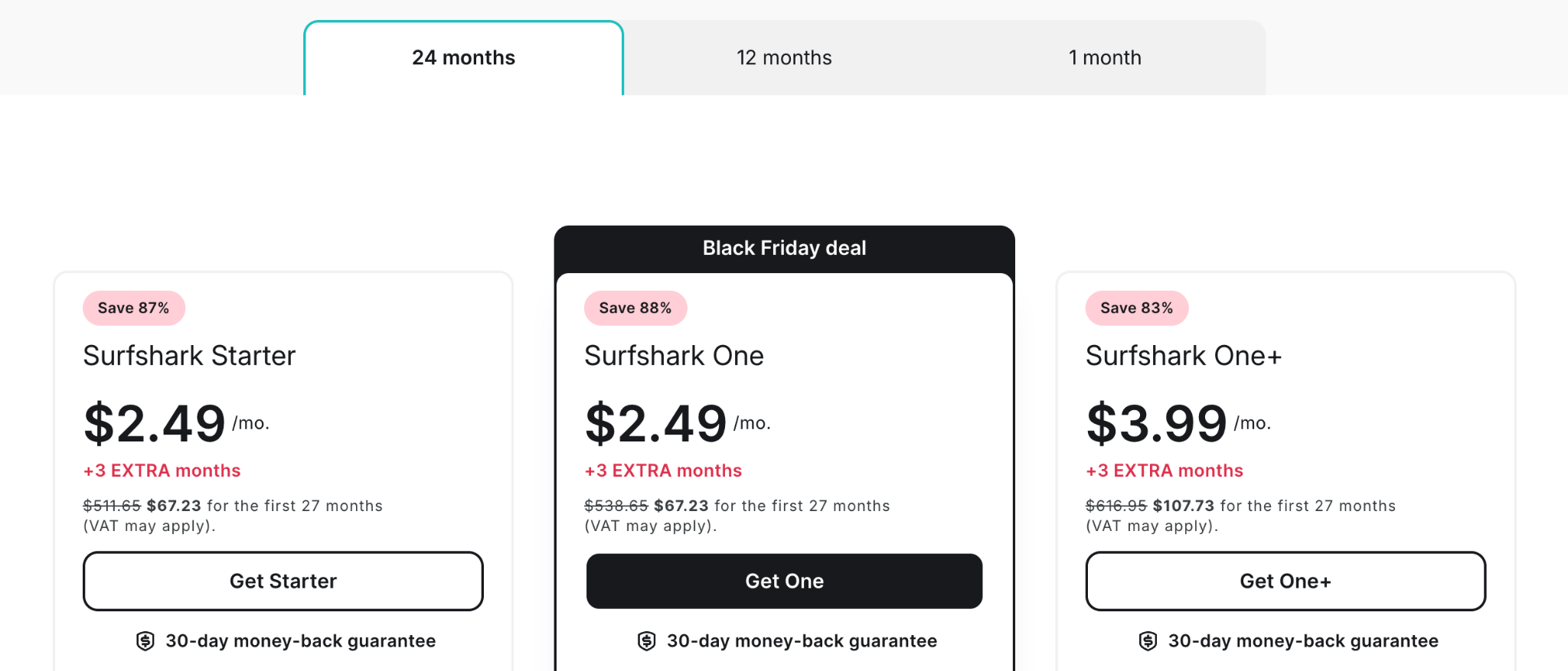
- Surfshark Starter: $2.49 per month, billed at $67.23 for the first 27 months.
- Surfshark One: $2.49 per month, billed at $67.23 for the first 27 months. This tier adds antivirus and data breach monitoring.
- Surfshark One+: $3.99 per month, billed at $107.73 for the first 27 months. It also includes Incogni’s personal data removal service.
These are introductory prices, and promotions can change. Your final payment may also vary depending on your currency, taxes, and discount code.
Surfshark is a recurring subscription, not a one-time purchase. Its two-year plans renew annually after the initial term at the applicable renewal price. Check the amount and billing period at checkout, and turn off auto-renewal in your account if you don’t want future charges.
Payment options include credit and debit cards, PayPal, Google Pay, Apple Pay, and cryptocurrency. Cryptocurrency payments aren’t available on mobile devices, and additional payment methods vary by region.
Is Surfshark cheap? – The facts speak for themselves.
Allows P2P
For many internet users, torrenting is the primary reason to use a VPN. However, not all VPN services today support P2P connections, and others provide too slow speeds for convenient file-sharing. Surfshark identifies itself as a P2P-friendly provider.
The main reasons to use the service for torrenting are:
- Kill switch;
- High speeds;
- Strict no-logs policy;
- Private DNS;
- Leak protection;
- Strong encryption.
Surfshark is a torrent-friendly VPN.
Fast server speeds
Speed is an essential characteristic of any VPN provider. It especially matters to users who plan to download torrent files or watch high-quality movies.
Surfshark delivered fast download speeds in our tests. The UK server reached 841Mbps, retaining 89.5% of our original connection speed. The US server delivered 783Mbps, retaining 83.3%.
The UK server performed better, but both locations retained most of our baseline speed. These results show a relatively modest performance impact on our test connection, with the US server trailing the UK by 58 Mbps.
Extensive server network
Surfshark now offers 4,500+ servers in 100 countries, so its coverage gives you plenty of locations to choose from, whether you want a nearby connection or an IP address in another country. Some countries also offer multiple city-level locations. For example, the UK has servers in London, Manchester, Glasgow, and Edinburgh.
The network uses RAM-only servers, which erase their contents whenever they reboot, and servers equipped with at least 10Gbps ports. These are useful infrastructure features, although port capacity should not be confused with the speed an individual user will receive.
Check out the cons
Doesn’t have the Tor over VPN option
Tor is open-source software developed by the US Navy in the 90s. Today, it is widely used among internet users who take care of online anonymity. When a user connects to the Tor network, their internet connection is encrypted and bounced among multiple Tor servers. Such servers are operated by volunteers all around the world. Thus, a third party is able to see only the IP address of the Tor exit node but not the real IP address of a user.
However, to make internet connections even more secure, some individual users prefer to use Tor over a VPN. It gives some extra benefits:
- Increases security level;
- A VPN is not able to see what encrypted data you send;
- Tor is not able to see your real IP address;
- You are still able to access the hidden services of Tor;
- Your ISP cannot see that you use Tor.
Of course, Tor over VPN option has its own disadvantages. For example, users’ traffic leaving the Tor exit nodes is not encrypted, therefore it can be monitored. Nevertheless, it is up to you whether to use this function or not. The fact is, Surfshark doesn’t offer Tor over VPN option.
Some lengthy connection times
Some users report Surfshark having some lengthy connection times. Fortunately, I didn’t face such a problem in our testing. In general, the VPN software ran fast, and there were no troubles with it. As it was described earlier, the interface is user-friendly and intuitive.
The app on my Windows desktop didn’t shut down on its own or close. The connection to the Surfshark servers didn’t take much time. I am completely satisfied with how Surfshark works.
Conclusion. Expert recommendation
So, I tried to analyze all the important features of Surfshark VPN. The provider has passed all the tests successfully. Now it is clear why it has so many positive reviews on the internet.
Surfshark is undoubtedly a good choice for home use. The software runs well on desktops and smartphones. Its stable work, no-logs policy, friendly customer support, and fast speeds are the major pros. Besides, torrent-optimized Surfshark servers make the provider the number one choice for those who need a VPN for P2P connections.
Is Surfshark worth using in 2026? My answer is Yes!