Best VPNs for YouTube
YouTube lets people watch, upload, and share videos, but access isn’t the same everywhere. Some countries block the platform, local networks may restrict it, and individual videos can be unavailable in certain regions.
A VPN can help you access YouTube by routing your connection through a server in another location and changing your public IP address. The VPNs in the list will help to keep access to YouTube:
- ExpressVPN offers easy-to-use apps for computers, phones, and supported smart TVs, making it a convenient option for watching YouTube across different devices. Its obfuscation helps disguise VPN traffic on networks that restrict VPN use.
- NordVPN includes obfuscated servers designed to make VPN traffic harder to detect, which can help when accessing YouTube on networks that block standard VPN connections.
- CyberGhost offers streaming-optimized servers and supports WireGuard for fast connections. However, it lacks obfuscation, making it less suitable for networks with strict VPN restrictions.
- VyprVPN includes its Chameleon protocol, which scrambles OpenVPN metadata to make VPN connections harder to identify and block, which can help on restrictive networks.
- IPVanish supports unlimited simultaneous connections, making it worth considering if you want to use a VPN on multiple household devices without a connection cap.
YouTube remains blocked in mainland China and Iran. Turkey and Pakistan have also blocked the platform in the past, but those historical bans shouldn’t be confused with permanent nationwide restrictions today.
If YouTube is unavailable on your connection, a VPN may help you access it via a server in a region where the platform is available. Connecting to a different location may also provide access to some region-restricted videos, although results vary.
Read our detailed reviews below to compare these five providers on streaming speed, privacy features, ease of use, and price.
How to unblock YouTube in Iran and China?
YouTube is blocked in mainland China and Iran. If YouTube is blocked where you are, a VPN may help you access it on your computer or phone. It encrypts your connection and replaces your public IP address with the VPN server’s IP address. However, it doesn’t make you anonymous or guarantee that authorities cannot identify you. For these reasons, check local rules and the risks of using a VPN before connecting.
Here’s how to try accessing YouTube:
- Choose a VPN that supports your device and install its app.
- Connect to a server in a country where YouTube is available.
- Open YouTube in your browser or app and try playing a video.
Some networks also block VPN connections, so this method won’t always work. Features such as obfuscation can make VPN traffic harder to detect, so pick a provider with obfuscation servers or an obfuscation protocol like NordVPN’s NordWhisper.
How to access YouTube at school, university, or work?
YouTube can be useful for lessons, tutorials, and work-related research. However, schools, universities, and employers may restrict access through their network policies.
A VPN may help you access YouTube on a restricted connection, but first check your organization’s acceptable-use policy. If you need a blocked video for a class or project, asking your teacher or IT team to approve access may be the simplest option.
Where VPN use is permitted, install the app on your device, connect to a server, and try opening YouTube.
YouTube VPN: What to consider when choosing?
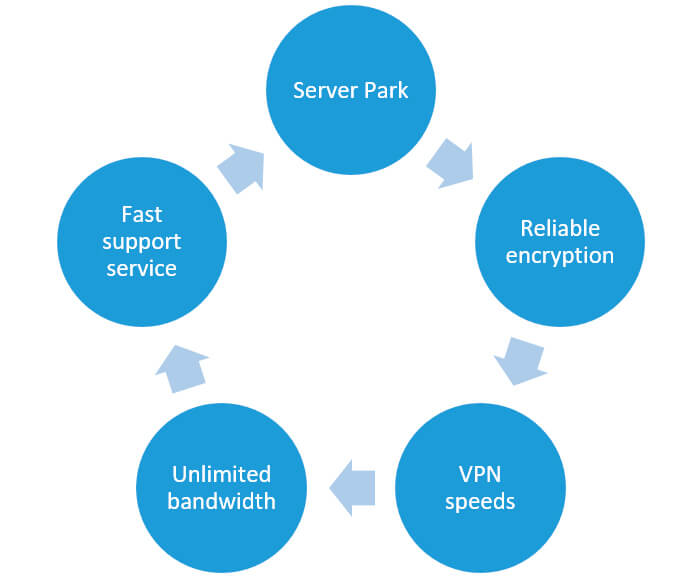
Now you know the 5 best VPNs for YouTube. But how were they rated? What to consider when choosing such a VPN?
These criteria we considered when we ranked our top 5 VPNs for YouTube:
- Server network. A wide choice of server locations gives you more connection options. Easy server switching also lets you try another location if YouTube is unavailable, although a large network alone doesn’t guarantee access.
- Reliable encryption. Strong encryption helps protect your traffic from monitoring on your local network. However, stronger encryption doesn’t automatically make a VPN better at unblocking YouTube.
- VPN speeds. Fast, consistent connections help minimize buffering and maintain video quality. YouTube recommends sustained speeds of around 5 Mbps for 1080p and 20 Mbps for 4K playback.
- Unlimited bandwidth. We prioritized VPNs without monthly data caps, so you can watch YouTube without using up a VPN data allowance. Your internet provider’s or mobile carrier’s data limits still apply.
- Responsive customer support. Helpful support makes it easier to troubleshoot connection and streaming problems. We favored providers with 24/7 live chat and clear setup guides.
Finally…
Don’t forget to consider the price for the VPN subscription. It should be reasonable for you. Remember that an expensive VPN doesn’t always mean the best one.
How to choose the best VPNs for YouTube: 7 useful tips
If you regularly watch YouTube, these seven tips will help you choose a VPN that suits your devices, budget, and streaming needs.
- Check its streaming performance. Look for recent tests showing whether the VPN can access YouTube and maintain steady playback.
- Look for a good choice of server locations. Choose a VPN with servers in the countries you need and easy server switching.
- Check free-plan limits. If you choose a free VPN, review its data allowance, speed restrictions, and available locations. Also, research its privacy practices – some free VPN apps share information with third parties to fund their services.
- Read the trial and refund terms. A free trial, a free plan, and a money-back guarantee are different offers. Check whether payment is required upfront, when billing starts, and which conditions apply to refunds.
- Evaluate privacy and security. Read the provider’s privacy policy, look for independent security audits, and check which permissions its apps request. Knowing how to use a VPN doesn’t make an unreliable service safe, and no VPN makes you completely anonymous.
- Make sure it supports your devices. Check for apps compatible with your operating system and the devices you use for YouTube, such as Windows PCs, Macs, Android phones, iPhones, and smart TVs. Also, check how many devices you can connect at once.
- Check router compatibility if needed. Setting up a VPN on a DD-WRT router or another compatible router can extend the VPN connection to multiple devices. However, not every router supports a VPN client, and manual setups may offer fewer features or slower performance than dedicated apps. Check support for your exact model before proceeding.
How to watch blocked YouTube videos with a VPN
A VPN may help you access YouTube on a restricted connection or watch videos unavailable in your region. Here’s how to get started, using NordVPN as an example:
- Choose a VPN plan. Visit NordVPN’s official website, compare subscriptions, and check the renewal price and refund terms.
- Create your account. Follow the checkout instructions, enter your email address, and complete your purchase.
- Install the app. Download NordVPN from its official website or your device’s official app store, then sign in.
- Connect to a server. Choose a country where YouTube – or the specific video you want to watch – is available.
- Open YouTube. Launch the app or visit youtube.com and try playing the video.
If the video remains blocked, try another server or contact your VPN’s support team. Access isn’t guaranteed, particularly on networks that also block VPN connections.
5 Best VPNs to Unblock YouTube
Which VPN should you choose for YouTube? Check this comparison of our five picks, covering prices, server coverage, streaming features, and tools for restrictive networks.
| Provider | Starting price | Servers and coverage | Money-back guarantee | Streaming-friendly features | Obfuscation |
|---|---|---|---|---|---|
| ExpressVPN | $2.99/month | Servers in 113 countries | 30 days for new users | Lightway protocol, apps for phones, computers, and supported TVs, up to 14 simultaneous connections | Automatic obfuscation across its server network |
| NordVPN | $3.49/month | Servers in 225 locations | 30 days | NordLynx protocol, SmartPlay technology. 10 simultaneous connections | Dedicated obfuscated servers and NordWhisper protocol |
| CyberGhost | $2.19/month | Servers in 100+ countries | 45 days on longer plans, 14 days on the monthly plan | Streaming-optimized servers, WireGuard, 7 simultaneous connections | Unclear |
| VyprVPN | $3.00/month | 700+ servers, nearly 70 countries, and 70+ locations | 30 days | WireGuard, easy server switching, desktop and mobile apps | Chameleon protocol disguises OpenVPN traffic |
| IPVanish | $2.19/month | 3,400+ servers in 150+ locations | 30 days on annual and two-year plans, excludes monthly subscriptions | WireGuard, unlimited simultaneous connections, server load and ping information | OpenVPN Scramble |
4 questions and answers about VPN you must know about
Even if you have already heard a lot about VPN services, still, some questions may not have been answered. We have 4 definite answers for you! Have a look at them below:
#1 Does a VPN slow down streaming?
A VPN can reduce your connection speed because it encrypts your traffic and routes it through an additional server. The impact depends on your original internet speed, the VPN protocol, the distance to the server, and the server load. A fast, stable connection should still leave enough bandwidth for smooth YouTube playback.
#2 How does encryption affect internet speed?
Encrypting and decrypting traffic requires processing, which can add some overhead. However, encryption strength alone doesn’t determine VPN speed. Modern protocols such as WireGuard are designed to combine strong security with efficient performance.
For better results, try your VPN’s recommended protocol and switch servers if playback buffers rather than weakening your security settings.
#3 Is your internet connection fast enough?
Test your download speed both with and without the VPN connected. If your connection is slow without a VPN, connecting to one usually won’t solve the underlying problem.
YouTube recommends sustained speeds of approximately:
- 2.5Mbps for 720p.
- 5Mbps for 1080p.
- 20Mbps for 4K.
Allow extra bandwidth if other people or devices share your connection. If playback buffers, try lowering the video quality or pausing other downloads.
#4 How does VPN server location affect streaming?
A VPN server’s location is where your traffic exits the VPN network. Connecting to a distant server can increase latency because your data has farther to travel. Server congestion can also affect performance.
Start with a nearby server in a country where YouTube or the video you want to watch is available. If performance is poor, try another server.
Choosing a VPN for YouTube comes down to reliable access, consistent speeds, device compatibility, and privacy protections. Use the comparison above to narrow your options, and check the refund terms before subscribing.
What are the reasons for blocking YouTube content?
Before trying to access blocked content, identify the type of restriction you’re facing. A countrywide block, a region-restricted video, and a school’s network filter are different problems – and a VPN won’t solve all of them.
Common reasons for restrictions include:
- Licensing and copyright. Video owners may limit availability to countries where they hold distribution rights. Copyright claims can also make a video unavailable in particular regions or worldwide.
- Local laws and government censorship. YouTube may restrict specific content to comply with local laws. Governments can also block access to the platform itself, including to suppress political or religious expression.
- Content and age restrictions. YouTube applies rules to harmful content and may age-restrict videos unsuitable for younger viewers. These restrictions aren’t the same as a geographical block.
- School and workplace policies. Organizations may restrict YouTube to manage bandwidth, enforce acceptable-use policies, or reduce distractions.
How a VPN can help unblock YouTube
A VPN routes your internet traffic through a server in another location and replaces your public IP address with that server’s IP address. This helps you access YouTube on a restricted network or watch a video available in the server’s country.
The VPN encrypts traffic between your device and its server, helping protect it from observers on your local network. However, it doesn’t make you anonymous: websites can still recognize you through your account, cookies, and other tracking methods. Your network administrator may also be able to see that you’re using a VPN.
Keep these limitations in mind:
- Access isn’t guaranteed. Some networks block VPN connections, and a provider that works in one location may not work in another.
- Not every restriction is location-based. A VPN won’t restore a deleted video or one blocked worldwide by its copyright owner.
- A VPN isn’t antivirus software. Encrypting your connection doesn’t make malicious websites or downloads safe. Some subscriptions include separate threat-blocking tools, but these are additional features, not benefits of the VPN tunnel itself.
- A free plan isn’t a free trial. Check data limits, server access, payment requirements, and refund conditions before signing up.
Choose a provider based on its current features and recent testing rather than promises of complete anonymity or unrestricted access everywhere.
Conclusion
The best VPN for YouTube should combine consistent streaming speeds, suitable server locations, compatible apps, and clear privacy policies. Compare the five providers above, check their current prices and refund terms, and choose one that fits your devices and budget.
Treat unblocking claims cautiously, especially if you need access in a heavily restricted country.
Comments