One-click connection, simplicity, and ultra-fast servers. All these are the characteristics that attract PlexVPN subscribers.
The product of Plex Inc. makes it possible to relish accessing any content of the World Wide Web. This issue is of current importance because of the censorship and content blocking worldwide.
For instance, over 1000 websites underwent blocking in Pakistan for anti-Islamic content in the year 2012. And the number of blacklisted sources increases year after year.
PlexVPN serves to overcome such restrictions.
PlexVPN is a safe and reliable VPN service that keeps its users secure while surfing the Internet.
Want to know more gripping facts about PlexVPN?
Keep on reading this Plex VPN review!
Tariffs and prices of PlexVPN
The pricing policy of the PlexVPN provider is quite flexible. It attracts many users with an individual approach to each consumer.
Thus, if one wants to protect only one gadget connected to the Internet, he/she will not have to overpay for extra devices.
Here are the main PlexVPN subscription options:
- 1-month plan costs $5.99/month/device. It's suitable for users who want to try the service without committing to a long-term subscription.
- 3-month plan costs $13.99 in total, with one additional month free. This brings the effective price to around $3.49/month/device.
- 12-month plan costs $42.99 and includes six additional months free. The effective monthly price is approximately $2.38/device.
- 36-month plan costs $105 and includes 24 additional months free. At around $1.75/month/device, this is the most affordable option.
Do you want to protect more than 1 device with PlexVPN?
PlexVPN lets you choose how many devices can connect simultaneously under one account. Available options include 1, 2, 3, 5, 10, 20, 40, and 60 devices. The subscription price increases with the number of devices, while the cost per device can decrease with larger packages.
The provider also offers a 3-day free trial for new users, allowing you to test the service before committing to a subscription. Additionally, all plans come with a 7-day money-back guarantee.
Keep in mind that PlexVPN's advertised discounts and promotional prices may change, so check the official website for the latest offers before purchasing.
Info on servers of PlexVPN
PlexVPN operates more than 5,000 servers across 70+ cities worldwide. Its app listings provide additional details, advertising 55 server locations in 38 countries across the Americas, Europe, Asia, and Oceania.
PlexVPN allows users to select a specific country and server through its app. Alternatively, they can use the Smart Connect feature, which automatically chooses a suitable server based on their connection.
The provider also promotes its network for accessing geo-restricted content, including streaming platforms such as Netflix, Hulu, and BBC. However, the actual availability of these services may vary depending on the server location and streaming platform.
Functions of PlexVPN
In spite of the poor server geography of PlexVPN, the provider is worth it because of its functions:
- One-click connection for a quick run of the service.
- Lag-free streaming thanks to the ultra-fast servers.
- Anonymous and safe web browsing.
- Access to blacklisted websites and online apps.
Platforms
People around the world use portable gadgets of different types to go online. PlexVPN developers took this fact into account and created a VPN client compatible with various platforms and OSes.
In such a way, Plex VPN may be used to protect PCs, laptops, tablets, and smartphones running on Android, iOS, Mac, and Windows.
However, PlexVPN is not compatible with AppleTV, Chromebook, routers, and game consoles.
Are you interested in how to run PlexVPN client?
Read the next section of the review.
Client account procedures for PlexVPN
If you are still interested in PlexVPN service, this part of the article will definitely be useful for you. Here are several steps to follow to become protected by PlexVPN service:
Step #1
First, read the Privacy Policy thoroughly. Visit the PlexVPN website and use a valid email for verification. After it, you will be sent a username and a password to log in to the system.
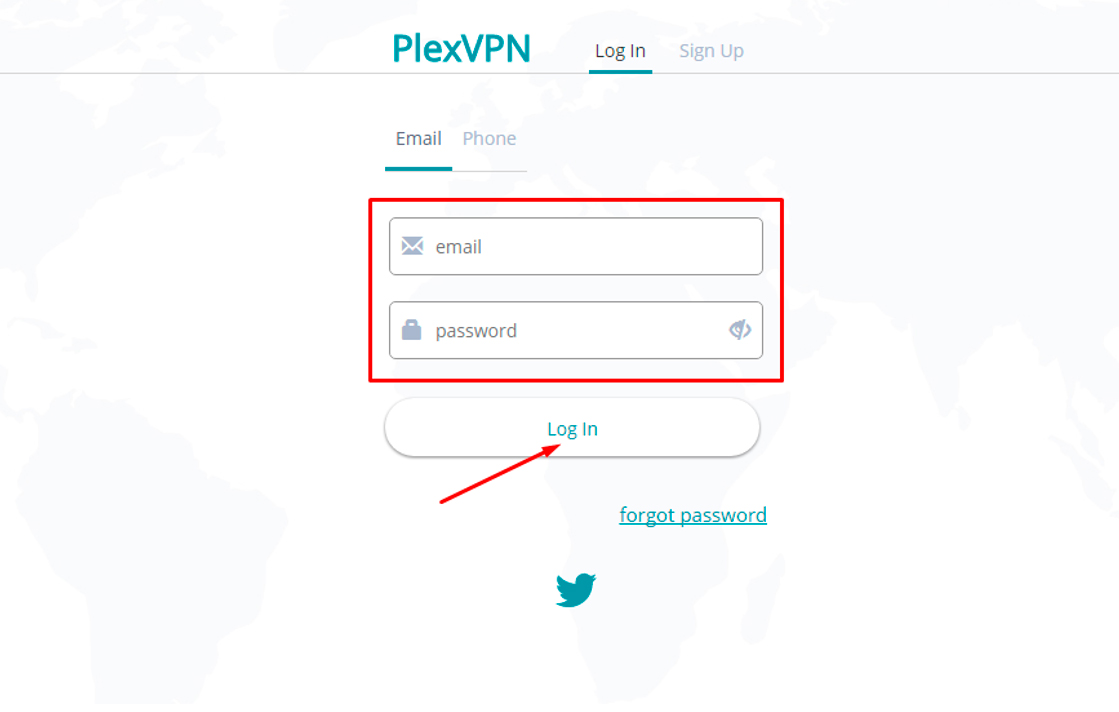
Step #2
The information about your tariff plan, balance, and other details you will find in your PlexVPN account.
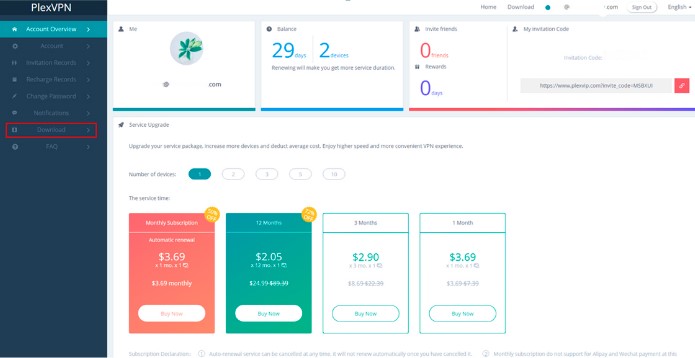
Download the client only from the PlexVPN website.
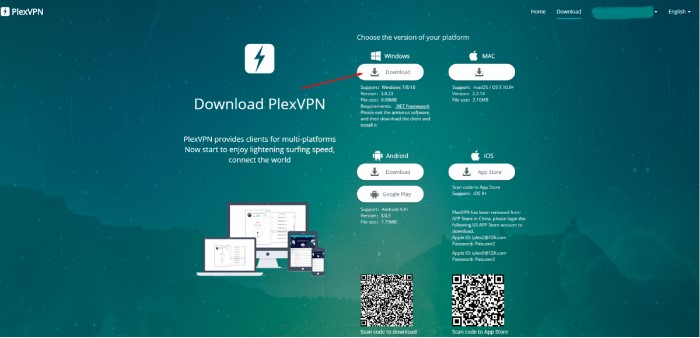
Step #3
PlexVPN client will be installed automatically. Manual setup is NOT required.
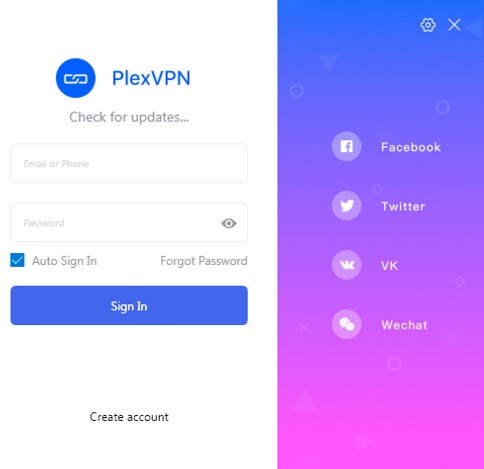
Step #4
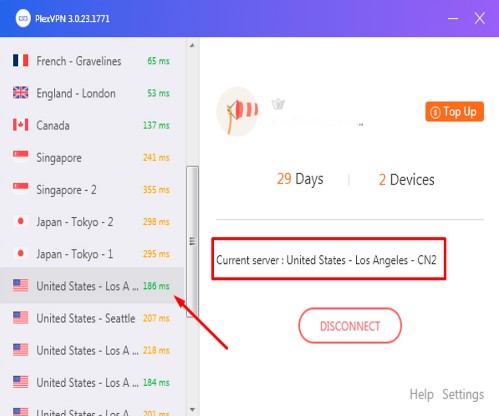
After signing in, PlexVPN user may connect to one of the available servers.
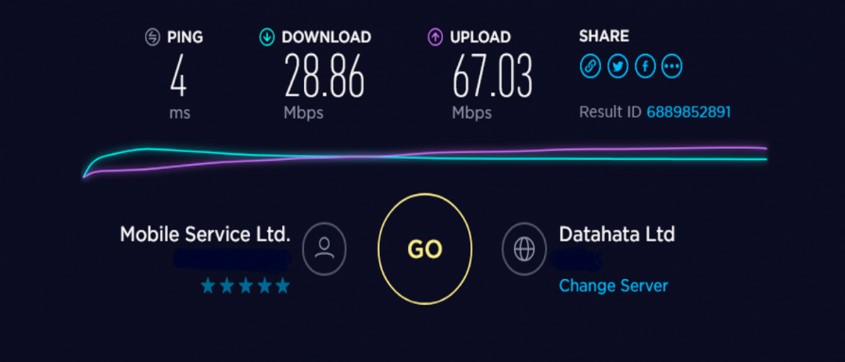
PlexVPN speed test showed that the speed decreases insignificantly:
- Download speed – by 4%
- Upload speed – by 9%.
The speed test results we have presented in this PlexVPN review demonstrate that streaming with this VPN service is great: no pauses or lags.
Support service of PlexVPN
The support service of PlexVPN consists of an FAQ section only.
Live chat support is not provided.
Summary of PlexVPN review
To draw the conclusion, one can say that PlexVPN is definitely worth using if a person has an Android, iOS, Mac, or Windows device. If not, get past.
Thanks to the fast servers located in different parts of the world, it becomes possible to bypass geo-restrictions of the place one lives in. American services such as Netflix, for example, are easily unblocked.
At the same time, PlexVPN does NOT mask or change user IP. In this way, a PlexVPN subscriber is devoid of anonymous surfing the Internet.
If you are looking for a service for restrictions bypassing without IP masking/changing, PlexVPN is a good choice thanks to its affordable prices and website unblocking.
| PlexVPN pros | PlexVPN cons |
|---|---|
| Super-high-speed servers; Websites and services unblocking; Flexible pricing system; Protection of 1, 2, 3, 5 or 10 devices per 1 account; Easy to install and use | No IP masking; Servers in 38 countries; No info on data encryption; Lack of live chat support |