tTorrent – torrent client for your Android device
Torrent sites help users find torrent files and magnet links, and a torrent client uses them to download and share files over the BitTorrent network. tTorrent is an Android app for managing those transfers on your phone. Using tTorrent or BitTorrent is legal, but downloading or sharing copyrighted files without permission can infringe copyright.
A VPN can add a layer of privacy while torrenting by encrypting traffic between your device and the VPN server. If your torrent traffic is routed through it, other peers will see the VPN server’s IP address rather than your own.
Read my guide on how to use tTorrent and why it’s a good idea to keep your VPN on when sharing P2P files.
How does tTorrent work?
To download a file with a torrent client, you first need a torrent file or magnet link. You can find these through torrent indexing sites such as the Internet Archive. The files themselves aren’t stored on those sites. Instead, they’re shared between torrent users.
A tracker helps the client find other users, known as peers, who have the file or parts of it. The client, such as tTorrent, then coordinates the transfer between peers, downloading and sharing pieces of the file.
From time to time, there aren’t any seeders, and as a result, the file can't be downloaded by the peer. In that case, you’ll simply have to wait and check again until the file becomes available for downloading.
What is the tTorrent client?
Let’s start with the definition.
tTorrent is a torrent client that allows you to download and share files on a smartphone or tablet running Android.
The application integrates with torrent search engines, making the process of finding files very fast and convenient. It is possible to choose the number of simultaneous downloads, limit the speed, and use other settings.
Currently, there are two versions of the tTorrent application. The only difference between them is that one is free with ads, and the other is paid and ad-free. Other than that, they are the same.
- tTorrent Lite is free and includes ads.
- tTorrent is the paid, ad-free version. It’s listed for $2.99 on the US Google Play Store.
tTorrent characteristics
| Versions | Free, ad-supported Lite version and paid, ad-free version |
|---|---|
| Latest update | November 9, 2026 |
| Version | 2.0.1 |
| Operating system | Android |
| Interface languages | Multiple, including English |
| Official website | http://ttorrent.org/ |
tTorrent is an Android BitTorrent client developed by tagsoft. It lets users download files, create torrents, and share files with others.
Save downloads to a memory card instead of filling your phone’s internal storage. Keeping some space free for apps and other files can help your device run smoothly. tTorrent supports saving files to external storage on compatible devices.

tTorrent supports sequential downloading, which downloads a file in order. For media files, this can let you start playback before the download is complete.
The Wi-Fi-only option lets you pause downloads when you’re using mobile data, helping you avoid using up your data allowance or incurring extra charges.

tTorrent includes an encryption option for connections, but that doesn’t encrypt the files themselves or hide your IP address from other torrent users. A VPN can add a layer of privacy by encrypting traffic between your device and the VPN server and showing peers the VPN server’s IP address.
How to use the tTorrent client?
tTorrent is an Android BitTorrent client that supports magnet links opened from your phone or tablet’s browser. You can use it to download files that are shared legally, such as public-domain works and open-source software.
The current version requires Android 7.0 or later. If your device meets that requirement, follow the steps below to install the app.
- Open Google Play on your Android phone or tablet, search for tTorrent Lite, and tap Install. The free Lite version is a good way to try the app before deciding whether to buy the ad-free version. Once it’s installed, open the app to continue.
2. To start a download, find a torrent file or magnet link from a source that’s authorized to share it. Open the link or file and choose tTorrent when prompted; the app will add it to your download list.
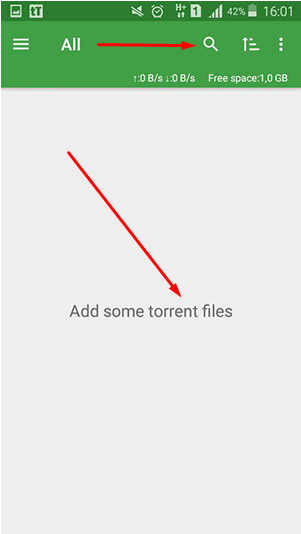
3. Choose a source that offers authorized torrent downloads, such as the Internet Archive for items whose rights allow sharing, or the official Debian and Ubuntu download pages. Find the torrent file or magnet link, open it with tTorrent, then choose where to save the download. The Internet Archive and Debian both provide BitTorrent downloads.
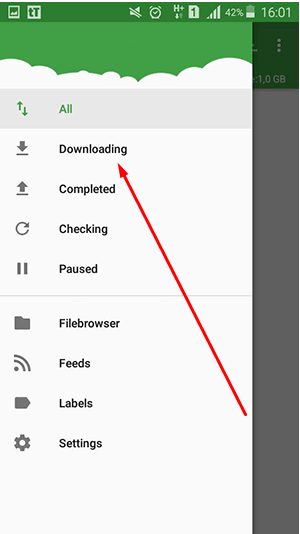
You can monitor the download process through the app. You can also pause the download process at any time.
Pros & Cons of the Torrent client
| Advantages | Disadvantages |
|---|---|
| + Easy to use | – Android OS only |
| + Supports magnet links | – No built-in torrent search |
| + Free and paid ad-free versions | |
| + Includes a connection-encryption option | |
| + Offers a Wi-Fi-only mode | |
| + Proxy support | |
| + Includes sequential downloading |
How to use tTorrent anonymously?
A VPN can add a layer of privacy while torrenting. It encrypts traffic between your Android device and the VPN server, and other peers see the VPN server’s IP address instead of your usual public IP.
To use one, connect to a VPN server before opening tTorrent. On Android 7.0 and later, you can also enable Always-on VPN and Block connections without VPN in your device settings. These options can keep network traffic from switching to a direct connection if the VPN disconnects.
Comments