Many of us depend on free public Wi-Fi access to get the information needed from the internet or to download music, videos, and games. Many of us are unaware of the fact that we are getting into danger by using the public hotspots to access the net.
It is easy for hackers to trace your online footsteps when you are using public hotspots without using any online protection. You need encryption of your online connection to stay safe while using the internet. You need to go for a good VPN service, which will hide your real IP address and allow you to surf the websites anonymously.
It is difficult to access certain websites from your country, as the government might have blocked the sites. When you use the OkayFreedom VPN software download, you can freely access even the blocked videos in uncensored form. So, with this reliable VPN service, you do not have to worry about data theft anymore.
You will be able to surf websites even when you are trying to access them from another country by concealing your IP address. Selecting the best server connection will not be a problem when you have installed this secure VPN software, as it makes the selection automatically or according to your preference.
Tariffs and prices
OkayFreedom currently offers 3 VPN plans to clients.
- Free account
This plan allows you to test the service with no commitment. You get limited locations and no premium support, but it’s still a decent choice for testing.
- Premium VPN
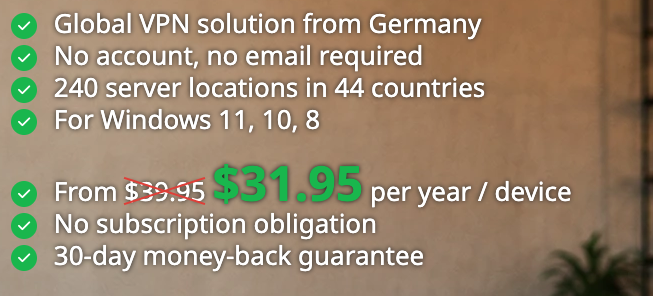
This plan has an annual charge of $39.95, with no subscription. You get unlimited traffic and there is a 30-day money-back guarantee to provide reassurance to any person having doubts about the quality of service.
- VPN subscription
This plan costs $31.95/year or $1.67/month. It’s a recurring subscription, and you get all the same perks as the Premium VPN plan, just at a better price.
Info on servers
There are 240 servers for OkayFreedom VPN located 44 different countries, including the UK, USA, Germany, France, etc. This Windows VPN client uses the OpenVPN protocol. You can choose the location you want to connect to by just clicking your mouse button once.
Functions
The important features that are offered by OkayFreedom VPN include:
- Automatic mode
This is a special feature you will enjoy when you opt for OkayFreedom VPN download. When the user is trying to access web content from a geographically restricted location, this VPN service will create an automatic connection with the nearest server in the region to give a false identity to use the internet.
- Performance
OkayFreedom offers better performance for downloading and uploading. You will be able to surf sites faster than many other VPN providers when you use this SSL VPN service.
- Protection at hotspots
The connection encryption by the service prevents data theft and keeps your personal information protected.
- Online invisibility
You can avoid being spied on using this service. Your IP address gets concealed, and it will be impossible for third parties to know your online presence and activities.
Security and privacy
The company uses the OpenVPN client, which is the most secure protocol available at present. Your connection will be encrypted using 128-bit Blowfish encryption, which makes it highly secure for users. OkayFreedom does not keep the details of the sites the users are visiting through the service.
It is not possible for third parties to understand who the users are using the specific IP addresses. There is absolutely no need to worry about privacy when you download OkayFreedom VPN for Windows. Data protection is done in accordance with German policy.
Support service
You can get the information needed about the service by visiting the FAQ & support section on the website or contacting the company through e-mail. There is a small knowledge base on the website, but there are no live chat options. The guidelines for usage are provided within the program, and the software can be unlocked using the license key.
Client account
There is no registration required to use the free service. You can simply install the OkayFreedom VPN software and start browsing the net without any censorship. There is no need for any password to access the account or service. When you are using a premium flat plan, you need to provide personal details such as name, e-mail address, city, postal code, etc. You need to also specify your payment option to start using the software.
Platforms
OkayFreedom is designed for use on devices using Windows operating systems. It will support Windows 11, 10, and 8. This software does not support Android devices, iPhone, iPad, or iPod. It is compatible with browsers such as Google Chrome, Internet Explorer, Firefox, Safari, Opera, etc. Thus, Opera VPN and other browsers are a good solution if you are going to use it on a PC or a laptop.
This is a complete solution for Windows devices, and it performs very well on Windows systems. The unique feature of this product is its ability to detect web content that is blocked in the country and reroute the user to a server that provides access to the blocked content.
Summary
OkayFreedom is a VPN service from Steganos, Germany, and is easy to use. It is an affordable product. You don’t have to find out which server you should use. The innovative automatic server connection mode and superb performance make it a good choice for any Windows system user. The only problem is the limited support options.
Mac and Linux users will not be able to enjoy the features offered by this product. If you are a Windows system user, you must have this VPN solution installed on your system to enjoy video streaming, online music, TV shows, sports, games, etc. OkayFreedom VPN is completely different from other similar programs in the fact that it not only conceals the IP address of your browser but will even protect you when you are using torrents and downloaders. Any Windows user will find this product most appropriate for their digital data protection online and for anonymous internet surfing.